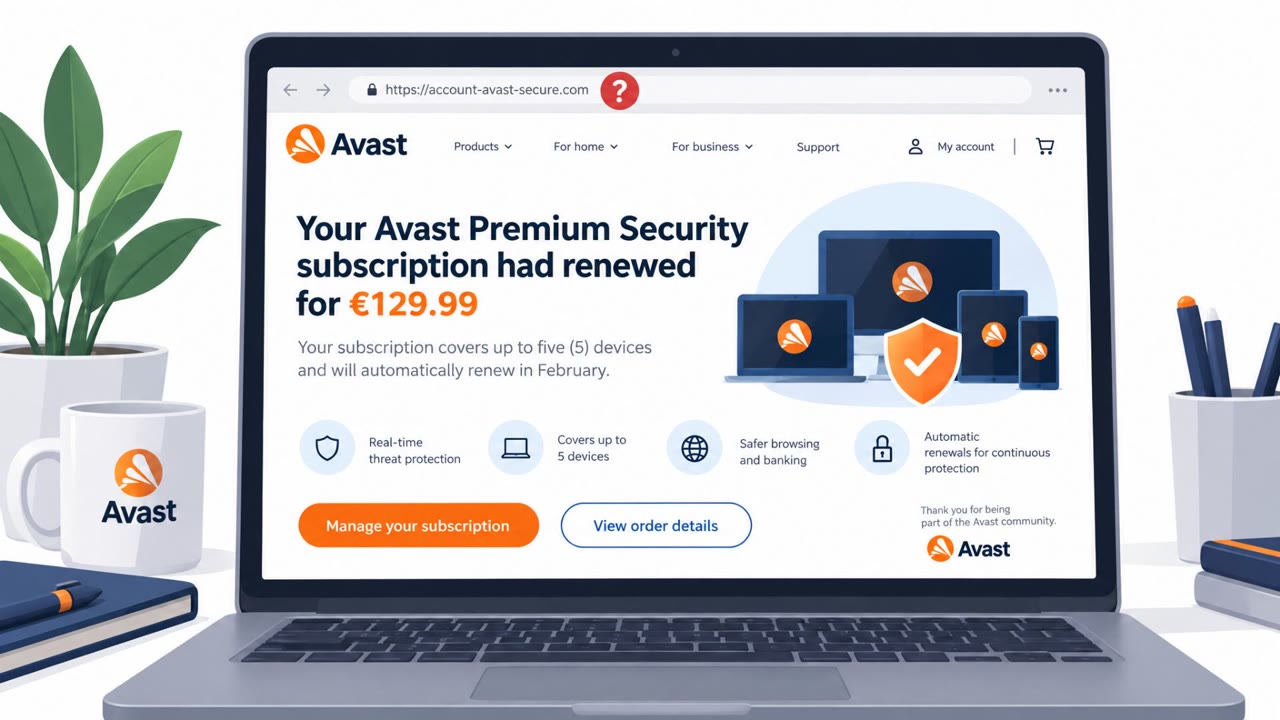
Researchers found a realistic-looking fake Avast renewal page that claims a subscription renewed for €129.99 and pushes victims to “cancel” by entering their name, email, and mobile number. The charge is fake, and the real goal is to collect contact details so scammers can follow up with a phone call and pressure victims to install remote access software or “reverse” a payment that never happened.
How the attack worked
This scam begins with a message claiming an antivirus subscription, in this case Avast Premium Security, has automatically renewed for €129.99. The message pushes the recipient to click through and cancel the charge. That link leads to a realistic-looking fake page showing an "Active" status badge and a summary table designed to make the fake charge look legitimate.
The cancellation form on that page does not ask for payment details. It asks only for a name, email address, and mobile number, information that feels harmless to hand over compared to a credit card number. That's the point: the form itself isn't the payoff. It's a way to harvest a working phone number tied to a real name, which is exactly what a scammer needs to set up the next stage.
Why it succeeded
The page reportedly showed signs of being built with AI assistance, including polished design, vague but plausible copy, and leftover developer-style notes in the source code. This lowers the effort needed to produce a convincing scam page and makes it harder for victims to spot obvious errors that used to be giveaways in older phishing attempts.
The form's narrow request for contact information also reduces suspicion. Asking only for a name, email, and phone number feels low-risk to most people, especially when the surrounding page looks polished and official. That false sense of safety is what carries victims into the next, more dangerous stage.
What to watch for
- Messages claiming a subscription "has automatically renewed" that push you toward an urgent cancellation link
- Cancellation forms that mainly want your phone number rather than any payment or account information
- Unsolicited follow-up phone calls referencing a payment problem you never reported through official channels
- Callers who ask you to install remote access software or help "reverse" a payment
How to build resistance
The follow-up call, not the initial page, is where the real danger begins. Awareness efforts should emphasize:
- Verifying any claimed charge directly against a bank or card statement before reacting
- Opening the official app or website independently to check a subscription status, rather than clicking a link in a message
- Treating cancellation forms that mainly request a phone number as a red flag, since the form is the lure and the call is the actual attack
- Never installing remote access software for someone who called unsolicited, regardless of how convincing the reason sounds
This technique maps to phishing via link (T1566.002), reconnaissance to gather victim information (T1598), impersonation (T1656), and remote access software abuse (T1219).
Key findings
- The scam starts with a message claiming an antivirus subscription “has automatically renewed,” and victims are pushed to cancel via instructions that lead to a fake page.
- A discovered scam site impersonating Avast targeted Belgian users and claimed “Avast Premium Security subscription has renewed for €129.99” and showed an “Active” status badge and a summary table.
- The cancellation form asked only for identity/contact info (name, email, Belgian mobile number), making it feel “harmless” while enabling follow-up phone scams.
- The next stage is a phone call where scammers pose as support and try to get victims to install remote access software or help “reverse a payment that never happened.”
- The page appeared AI-assisted (polished design, vague but correct copy, and leftover developer-style notes in the source code), lowering the barrier to creating convincing scam pages.
Who’s being targeted
- Commonly targeted roles: All employees, Finance/AP, IT helpdesk/service desk, Executive assistants.
- Affected industries: Consumers / General public, Small business users (home/SMB endpoints), Cybersecurity software customers.
- Attack channels: email, website, vishing.
- Impersonated: Avast billing/subscriptions support, Avast support staff / billing support.
Red flags to watch for
- Creates urgency by claiming money was taken when it wasn’t
- Cancellation happens via a simple form instead of signing into your real account
- The form focuses on collecting a phone number so someone can call you
- Unsolicited support call tied to a ‘payment problem’ you didn’t initiate through official channels
- Pressure to install remote access software
- Talk of reversing/refunding a charge that never appeared on your statement
Frequently asked questions
What is the fake Avast renewal page scam?
It's a scam that starts with a message claiming an Avast Premium Security subscription renewed for €129.99, directing victims to a fake page with a cancellation form that collects their name, email, and mobile number.
Why does the scam ask for a phone number instead of payment details?
The cancellation form mainly wants a phone number because the real goal is to set up a follow-up call where scammers pose as support staff and try to get victims to install remote access software or help reverse a payment that never happened.
How can I tell if an antivirus renewal notice is fake?
Check your bank or card statement directly rather than trusting the message, and open the official app or website yourself instead of clicking any link in the notice.
What should I do if I get a call about a supposed antivirus payment?
Treat the call as the real danger point in the scam and never install remote access software for someone who called you unsolicited.
Read the video transcript
You get an email: “Your Avast Premium Security subscription has renewed for €129.99.” Panic, right? You click “cancel” and land on a polished Avast-lookalike page saying your subscription is Active for €129.99, asking only for your name, email, and Belgian mobile number. That “harmless” form is just to get a working phone number. Next, you get a call: “I’m calling about your antivirus payment, let’s fix this.” They push you to install remote access software or “reverse” a payment that never hit your bank. Here’s the move: if a message says an antivirus payment already went through, don’t click cancel, check your bank or card statement yourself. No charge, no panic, delete and move on.