
AI vishing simulation and training
Mirage’s vishing simulator tests how your employees handle voice phishing with realistic AI phone calls, then coaches each person with immediate feedback.
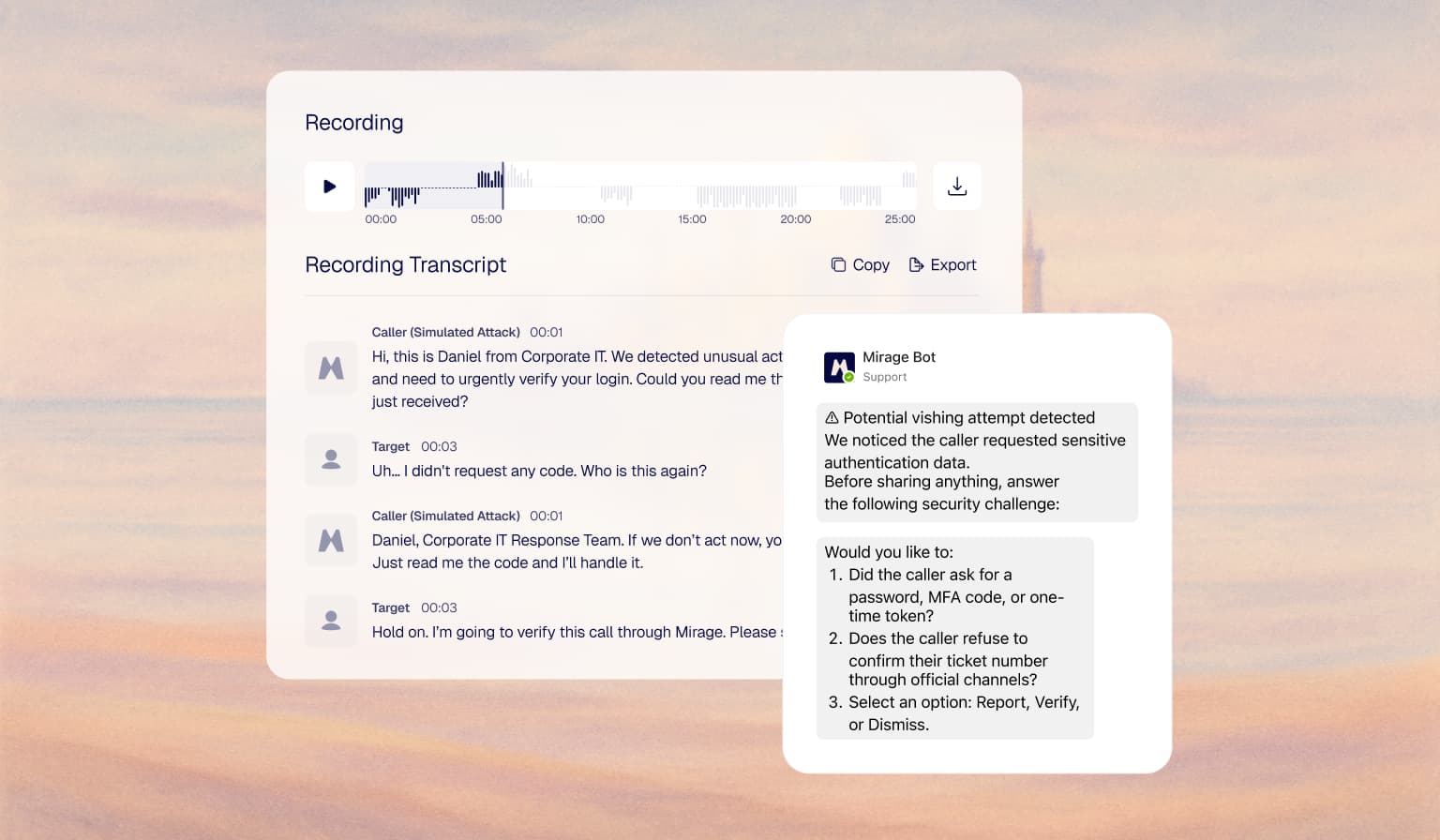
Attackers now reach employees by phone, SMS and video as well as email, and AI lets them clone the voices of people your staff trust. Mirage runs realistic vishing simulations against your own team, so you can find the gaps and train people before a real attacker calls.
Vishing, short for voice phishing, is a social engineering attack in which someone uses a phone call to manipulate a person into sharing sensitive information or doing something harmful. One call can be enough:
- In 2023, attackers posing as an employee called MGM Resorts’ IT help desk, and the attack that followed cost MGM an estimated $100 million in third-quarter results (SEC filing).
- In 2024, an Arup employee in Hong Kong sent HK$200 million (about US$25.6 million) to fraudsters after a video call with deepfakes of senior colleagues (CNN).
What is a vishing simulator?
A vishing simulator is a security training tool that places realistic, authorized voice phishing calls to your employees and records how they respond. It shows where your organization is exposed, highlights the people most at risk, and builds resilience through regular training and feedback.
Many simulators play pre-recorded voices or follow a fixed script. Mirage uses AI to hold a live conversation, so each call reacts to what the employee says and reflects the tactics attackers use today, including voice cloning and deepfakes.
Key features of Mirage’s vishing simulator
Realistic attack scenarios
Scenarios are built on real attacker tactics, such as executive impersonation, vendor fraud and IT help desk scams. Start from a library of scenarios segmented by department, or create your own.
Natural AI voices and consented voice clones
Mirage’s AI voices sound natural and can mimic accents, tone and individual speech patterns. With written authorization from the person involved, a scenario can also use a deepfake clone of a real colleague’s voice, such as your CISO’s.
Calls that adapt to the employee
If an employee hesitates or pushes back, the AI caller can escalate the way a determined attacker would. Employees practice against a live conversation, not a recording.
Campaigns tailored to your risks, at scale
Aim each campaign at the risks a team actually faces, such as executive impersonation for finance or help desk scams for IT. AI lets you run hundreds of unique scenarios across large teams without losing personalization.
Detailed reporting
Reports track employee actions, response times and critical events, such as sharing credentials. You get individual results, department trends and executive summaries in one portal, alongside training progress and live threat reports.
Immediate, personalized coaching
After a simulation, each employee gets conversational training in the browser, based on the attack they just experienced. Feedback is immediate and specific, reinforcing good habits and correcting risky ones.
Threat reporting in Slack and Teams
Mirage’s Slack and Teams bot walks employees through reporting a suspicious call or message, capturing the evidence and sending a structured report to your channels. Mirage’s training shows employees how to report, and those reports help Mirage submit takedowns and raise awareness of real attacks.
Live demo
Experience It Now
Put yourself in the seat of an employee receiving a real-sounding call. Mirage simulates AI-powered social engineering using consent-based demo personas and controlled scenarios, so you can see what your team is up against without putting anyone at risk.
Type of threat
Wait for the call
What you get from vishing simulation
Employees who recognize vishing
Regular simulations teach employees the warning signs, such as unusual requests, false urgency and mismatched caller IDs. People who have practiced against these tactics are less likely to fall for a real call.
Faster reporting
Simulations train employees to report suspicious calls to IT or security. The sooner a real attempt is reported, the less damage it can do.
A clear picture of human risk
Results show which people and departments are most exposed, so you can focus training where it will make the biggest difference.
Training that fits each team
Finance teams can practice against wire fraud and executive impersonation, while IT teams learn to spot fake vendor and help desk requests.
Support for compliance requirements
Some regulations require social engineering training. For example, NYDFS Part 500 (23 NYCRR Part 500) requires the financial services companies it covers to give all personnel cybersecurity awareness training that includes social engineering at least once a year (§ 500.14(a)(3)).
Lower risk of an expensive breach
Stopping a single successful vishing attack can avoid breach costs, fines and reputational damage. IBM’s Cost of a Data Breach Report 2026 puts the global average cost of a data breach at $4.99 million.
How to implement a vishing simulator
Step 1: Assess your current vulnerabilities
Before you launch, look at how exposed your organization is to vishing. Identify the departments and people who handle sensitive data, payments or requests from outside parties.
Step 2: Customize scenarios
Choose scenarios that reflect the threats you actually face. For example:
- Fake executive calls to finance teams
- Vendor scams aimed at procurement staff
- Calls to the IT help desk from someone posing as an employee
Step 3: Deploy simulations
Launch simulated vishing calls across the organization. AI-driven calls keep each scenario realistic and responsive to what the employee says.
Step 4: Analyze responses
Track how employees respond. Did they share sensitive information? Did they report the call? Use the results to measure awareness by person and by team.
Step 5: Provide immediate feedback
After each simulation, show employees what they did well and what to do differently next time. Mirage delivers this as personalized, conversational training straight after the call.
Step 6: Repeat and improve
Attack tactics keep changing, so run simulations regularly and update scenarios to reflect new techniques, such as those in the real-world attacks we break down in Threat Watcher.
They can be, when they are designed to protect people rather than catch them out. Mirage follows published ethical simulation standards: simulations run on corporate channels by default, never impersonate law enforcement or invent personal emergencies, and stop immediately if an employee appears to be in distress. The goal is constructive feedback, not shaming anyone who falls for a call.
Only with permission. Mirage creates a voice clone of a real person only when you explicitly request it and that person has given written authorization, and the clone is used only for the agreed simulation. Voice samples are destroyed when your agreement ends, and Mirage does not keep libraries of employee voices.
Start with the people attackers are most likely to call and who can do the most damage if they comply. That usually means finance staff who approve payments, IT help desk staff who reset passwords, procurement staff who deal with vendors, and anyone with access to sensitive data. Both the MGM and Caesars attacks began with social engineering aimed at IT support.
Run them regularly, quarterly or twice a year, so skills stay sharp, and update scenarios as attackers change tactics. Use each round’s results to decide where to focus the next one. If you are covered by NYDFS Part 500, social engineering training is required at least once a year.
They get immediate, personalized feedback, not a reprimand. Mirage follows up with conversational training in the browser, based on the call they just experienced, so they know what to watch for next time.
Reports track what each employee did on the call, how quickly they responded, and critical events such as sharing credentials. You can see individual results, department trends and executive summaries, together with training progress and live threat reports, in one portal.
No. Vishing is a core use case, but Mirage also runs coordinated multi-channel simulations over SMS, email and chat tools. Its Slack and Teams bot lets employees report suspicious messages from the tools they already use.
Yes. Mirage integrates with single sign-on (SSO), Active Directory, HR information systems (HRIS) and SIEM platforms. Its threat reporting bot works in Slack and Microsoft Teams.
Mirage uses encryption and strict tenant segmentation, and is SOC 2 Type II compliant. Simulation data is never sold, and it is not shared with third parties or used beyond your agreement without your explicit authorization. Voice samples are destroyed when your agreement ends.
Yes. You can take a consent-based simulated call from Mirage in your browser or on your phone, using the live demo on this page or the standalone simulation. To run simulations for your organization, get a demo.
Background on vishing
What is voice phishing (vishing)?
Vishing, a blend of “voice” and “phishing”, is a social engineering attack in which someone uses a phone call or other voice channel to manipulate a person into sharing sensitive information or taking a harmful action. Unlike email phishing, it exploits the trust and urgency people associate with a live conversation.
Common vishing scenarios
- Executive impersonation. Callers pose as senior executives and pressure employees to transfer funds urgently or share confidential company information.
- Vendor fraud. Fake calls from trusted vendors ask for login credentials or sensitive business information.
- Technical support scams. Attackers pose as IT support and persuade employees to install malicious software or share system access.
- Help desk impersonation. Attackers pose as an employee and ask the IT help desk to reset a password or grant access, the approach behind the 2023 MGM Resorts attack.
How vishing has evolved: real-world examples
Attackers now use AI voice cloning to mimic specific people convincingly. AI also helps them mask accents and polish their grammar, so they can target more people with tailored, believable calls.
The cases below show what a convincing call or deepfake can cost. For newer attacks, see Threat Watcher, where we break down real-world social engineering attacks.
MGM Resorts (2023)
In September 2023, the ALPHV (BlackCat) ransomware group claimed it had found an MGM Resorts employee on LinkedIn, then called the IT help desk posing as that person, and that the call took 10 minutes (Engadget). The attack disrupted MGM’s systems for more than a week. MGM estimated a negative impact of about $100 million on its third-quarter results, plus less than $10 million in one-time costs (SEC filing).
Caesars Entertainment (2023)
Shortly before the MGM breach, Caesars Entertainment disclosed that attackers had got into its network through a social engineering attack on an outsourced IT support vendor and copied its loyalty program database. Caesars reportedly paid about $15 million, roughly half of the attackers’ $30 million ransom demand.
Arup (2024)
An employee in the Hong Kong office of British engineering firm Arup joined a video call with what appeared to be the company’s chief financial officer and other colleagues, all of them deepfakes. Following their instructions, the employee made 15 transfers totaling HK$200 million (about US$25.6 million) to five bank accounts.
Ferrari (2024)
Ferrari stopped an attempt in which a fraudster impersonated CEO Benedetto Vigna on WhatsApp, using an AI clone of his voice to draw an executive into a fake acquisition deal. The executive checked by asking about a book Vigna had recently recommended, which exposed the scam.
Best practices for vishing simulation training
- Run simulations regularly. Quarterly or twice a year keeps skills sharp.
- Close the feedback loop. Use what you learn from each simulation to improve the next round of training.
- Cover more than the phone. Combine vishing simulations with phishing, smishing and ransomware training.
- Focus on high-risk employees. Give extra training to people with access to sensitive data or finances.
- Explain the purpose. Make sure employees know simulations are there to protect them and the organization, not to catch them out or shame them.

Reviewed by Ross Lazerowitz
Co-Founder and CEO ·