Researchers disclosed a critical Microsoft Copilot (personal) vulnerability chain that could let an attacker steal enterprise data by getting a user to open a legitimate-looking link or summarize a crafted webpage. The attack abuses Copilot features (auto-running prompts, connected-app access, and web summarization) to pull data from services like Gmail/OneDrive and send it to an attacker-controlled webhook, with little to no obvious user warning.
How the attack worked
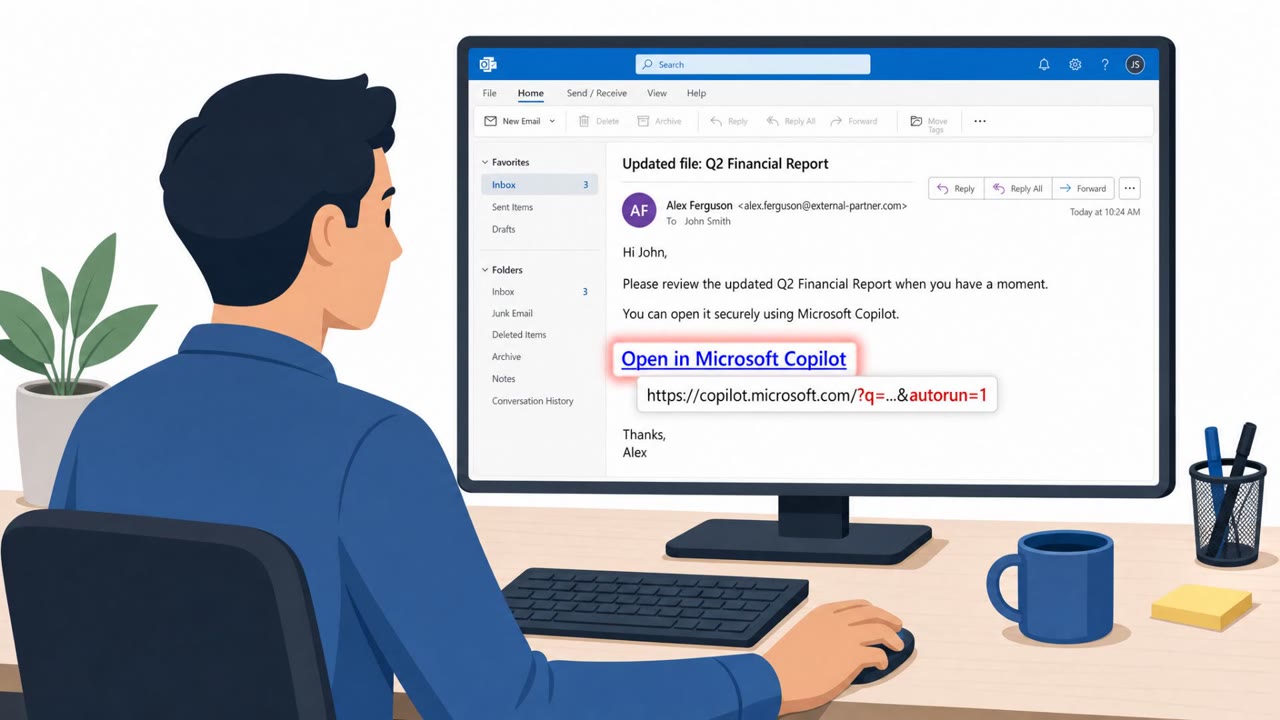
This disclosed exploit chain against Microsoft Copilot (personal) relied on getting a user to open a legitimate-looking link or have Copilot summarize a crafted webpage. Researchers described the core exploit pattern simply: one click on a legitimate-looking link is enough. A URL parameter, combined with an undocumented parameter, could cause an attacker-supplied prompt to execute instantly on page load, with no click, confirmation, or additional user action needed once the link was opened.
Once triggered, the injected prompt could query the victim's connected apps, including Gmail, Drive, Calendar, or OneDrive, encode the results into a URL, and exfiltrate them via Copilot's built-in URL-fetch capability to an attacker-controlled webhook. A second scenario involved a crafted webpage that, when summarized by Copilot, wrote attacker instructions directly into the victim's permanent memory store rather than requiring repeat clicks.
Why it succeeded
The chain succeeded because it exploited trust in ordinary-looking actions: clicking a link or asking an AI assistant to summarize a page. Neither action typically raises suspicion for employees or executives. The automation built into Copilot, meant to streamline access to connected apps and content summarization, removed the usual friction points (approval prompts, visible warnings) that might otherwise alert a user that something unusual was happening.
The persistence mechanism made the issue harder to contain. The injection reportedly survived password changes, session revocation, and device re-enrollment, meaning that every standard incident response step could leave the injection intact.
What to watch for
- Links containing unusual query parameters, especially referencing a "?q=" parameter or other undocumented parameters
- Unexpected AI assistant activity immediately after opening a link or webpage, with no approval step shown
- Copilot or similar tools returning or referencing unusually broad access to email, calendar, or file contents
- Persistent or odd AI assistant behavior across sessions after summarizing an unfamiliar webpage, even following password resets
Building resistance
- Treat "legitimate-looking" links as risky when they trigger automated AI actions; verify sender and context before clicking, especially in emails or shared documents
- Regularly review which apps are connected to AI assistants like Copilot, since connected-app access to Gmail, Drive, Calendar, or OneDrive can be abused if compromised
- Exercise caution using "summarize this page" AI features on unfamiliar or untrusted websites, since prompt injection can persist in memory settings
- Incorporate AI assistant memory and settings review into incident response procedures, since traditional steps like password resets may not remove AI-driven persistence
Key findings
- The exploit pattern is described as: “one click on a legitimate-looking link is enough.”
- Varonis says a URL parameter could cause “any attacker-supplied prompt to execute instantly on page load: no click, no confirmation, no user action.”
- Injected prompts could query “connected apps, such as Gmail, Drive, Calendar or OneDrive” and exfiltrate results to “an attacker-controlled webhook.”
- A crafted webpage summarized by Copilot could inject instructions into “the victim’s permanent memory store,” persisting through common incident-response actions.
- Microsoft labeled the issue “critical” (CVE-2026-24301) and stated customers were already protected after patching.
Who’s being targeted
- Commonly targeted roles: All employees, Executives, IT & Security teams, Users of Microsoft Copilot (personal and enterprise contexts), Users with connected Gmail/Google Drive/Calendar/OneDrive.
- Affected industries: Cross-industry enterprises using Microsoft Copilot / connected SaaS apps, Technology and IT services, Any organization with staff using personal Copilot accounts alongside enterprise environments.
- Attack channels: email, website.
- Impersonated: A legitimate-looking link/source (no specific brand impersonation stated), A normal-looking webpage (no specific brand impersonation stated).
Red flags to watch for
- A link that includes unusual query parameters (the article references a “?q= URL parameter” and an “undocumented parameter”)
- Unexpected Copilot activity on page load (no prompt approval step)
- Requests/results involving unusually broad access to email and file contents
- Webpage contains hidden or irrelevant “instructions” that don’t match the visible content
- Copilot starts behaving oddly across sessions after summarizing a page (persistent behavior change)
- Changes persist even after typical account security steps (password reset/session revoke)
Frequently asked questions
What made this Copilot vulnerability critical?
A URL parameter combined with an undocumented parameter could cause an attacker-supplied prompt to execute instantly when a page loaded, with no click, confirmation, or user action required beyond opening the link.
What data could attackers access through this flaw?
An injected prompt could query connected apps such as Gmail, Drive, Calendar, or OneDrive, then exfiltrate the results via Copilot's built-in URL-fetch capability to an attacker-controlled webhook.
Could this attack persist after a password reset?
Yes. A crafted webpage summarized by Copilot could inject instructions into the victim's permanent memory store, and researchers noted this persisted through password changes, session revocation, and device re-enrollment.
Has Microsoft fixed this issue?
Microsoft labeled the issue critical, tracked as CVE-2026-24301, and stated that customers were already protected after patching.
Read the video transcript
With CoSnitch, one click on a legit‑looking link is enough for Copilot to start leaking your data. That link can auto‑run a hidden Copilot prompt via a ?q= parameter, no extra click, no confirmation, then quietly pull from Gmail, Drive, Calendar, or OneDrive and send it to a webhook. Worse, if you ask Copilot to summarize a crafted webpage, it can write hidden instructions into Copilot’s permanent memory that survive password changes and session revokes. If a link or page makes Copilot act on its own, stop and report it, do not trust or reuse that link, and flag the behavior to security immediately.