Researchers observed phishing sites that appear “dead” to security scanners but turn into convincing fake bank login pages when a victim arrives from poisoned Google/Bing search results. The goal is to steal banking credentials while keeping the malicious pages online for days or weeks by showing different content based on referrer information.
How the attack worked
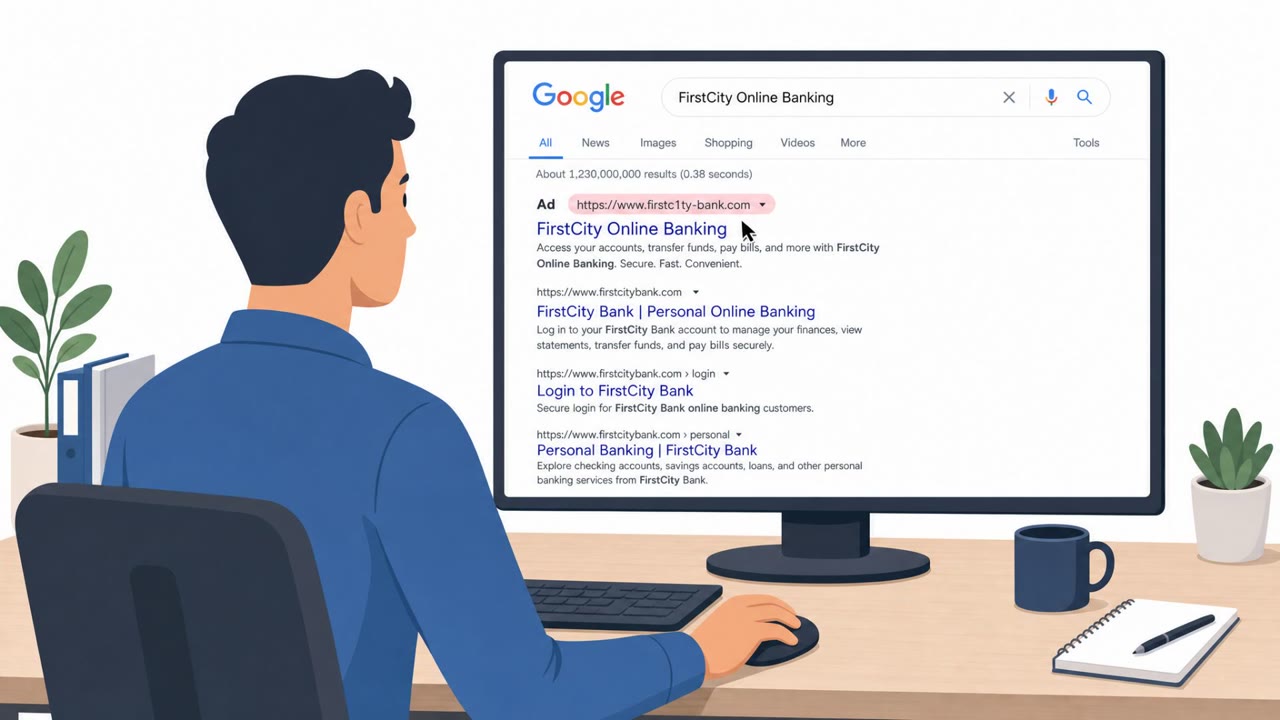
Attackers used SEO poisoning to push fake banking pages to the top of Google and Bing results for high-intent searches like "Bank Name Customer Portal" or "Credit Card Login." Instead of compromising a real bank's domain, they registered new typosquat domains, including unusual second-level domain variants such as .ph.com and .gr.com, and built the fake pages there. The core trick is what researchers call presentation control: the server decides what content to show based on how the visitor arrived. Someone typing the domain directly, with no search engine referrer, sees a dead, offline-looking page. Someone clicking through from the poisoned search result instead lands on a convincing fake bank login page designed to capture credentials.
Why it succeeded
This referrer-based cloaking is effective because it targets the exact moment a victim is most likely to trust the page, right after clicking a top-ranked search result for their own bank. It also defeats casual verification. A direct visit, the kind a security analyst or automated scanner would typically perform, shows nothing suspicious, which lets the poisoned search results stay active for days or weeks before being flagged and removed. The combination of high search ranking and inconsistent content makes the sites look legitimate to both users and standard security sweeps.
What to watch for
- A banking login page reached through a search result rather than a bookmark or the official app
- A lookalike or typosquat domain, especially with unfamiliar SLD variants, instead of the bank's real domain
- A site that behaves differently depending on how it's accessed, such as looking broken when typed directly but showing a login form when reached from search
- A reported phishing URL that appears completely harmless when opened directly
How to build resistance
- Train users to skip the search bar for banking logins and instead use a saved bookmark or the bank's official app
- Reinforce that top search results can still be malicious impersonations and that the domain should be checked carefully before entering credentials
- Update security triage playbooks so analysts use referrer spoofing and browser emulation as standard steps when testing a reported URL, since a direct visit alone is no longer a reliable test
- Monitor brand keywords in search rankings as part of external attack-surface monitoring, flagging cases where a brand term suddenly points to a domain the organization doesn't own
This attack pattern relies on techniques like phishing via search engines (T1598), user execution through a malicious link (T1204.001), and impersonation to steal credentials (T1656, T1566.002).
Key findings
- Attackers use SEO poisoning so fake pages rank for high-intent searches like “Bank Name Customer Portal” and “Credit Card Login”.
- The fake banking sites are typically newly registered typosquat domains (not compromised legitimate domains), including on SLD variants like .ph.com and .gr.com.
- The sites use “presentation control” (referrer-based cloaking) to show an offline/blank page to direct visitors and scanners, but a fake login page to users arriving from search results.
- This cloaking helps poisoned search results stay active “for days or weeks.”
Who’s being targeted
- Commonly targeted roles: All employees, Finance, Security team, SOC, Executive leadership (CISO/IT leadership).
- Affected industries: Banking, Financial services, Consumers (online banking users).
- Attack channels: website.
- Impersonated: Victim's bank (customer portal / credit card login), Fake banking website using referrer-based cloaking.
Red flags to watch for
- Login page reached via a search result instead of a saved bookmark or official app
- Lookalike/typosquat domain (not the bank’s real domain), including unusual SLD variants
- Page behavior changes depending on how you arrive (e.g., looks broken when typed directly but shows a login from search)
- A reported phishing URL appears harmless when opened directly
- Inconsistent content served to different visitors
- Poisoned results remain live unusually long due to cloaking
Frequently asked questions
How do these fake bank login pages evade security scanners?
They use presentation control, a referrer-based cloaking technique that shows a dead, offline-looking page to direct visitors or scanners, but serves a convincing fake login page only to users who arrive via a poisoned search result.
Are these phishing sites hosted on hacked bank domains?
No, the key findings note the fake banking sites are typically newly registered typosquat domains, including unusual second-level domain variants like .ph.com and .gr.com, rather than compromised legitimate domains.
How can users avoid landing on these fake bank pages?
Skip the search bar for banking logins and instead use a saved bookmark or the bank's official app, since attackers rank these pages for high-intent search terms like customer portal or credit card login.
How should security teams test a reported phishing URL now?
Treat referrer spoofing and browser emulation as standard steps when testing a reported URL, since a direct visit alone no longer reliably shows what a real victim would see.
Read the video transcript
You Google “Bank Name Customer Portal,” click the top result… and hand your bank password to a fake site. Attackers use SEO poisoning so their brand‑new typosquat domains on .ph.com or .gr.com outrank the real bank. From search, you see a perfect‑looking login. Type that same URL in directly, and it looks dead or offline. Here’s the nasty trick: this “presentation control” hides phishing from scanners, so poisoned search results stay up for days or weeks, quietly catching anyone who searches for “Credit Card Login” instead of using a bookmark or app. Your move: never search for your bank login. Use a bookmark or the official banking app, every time.