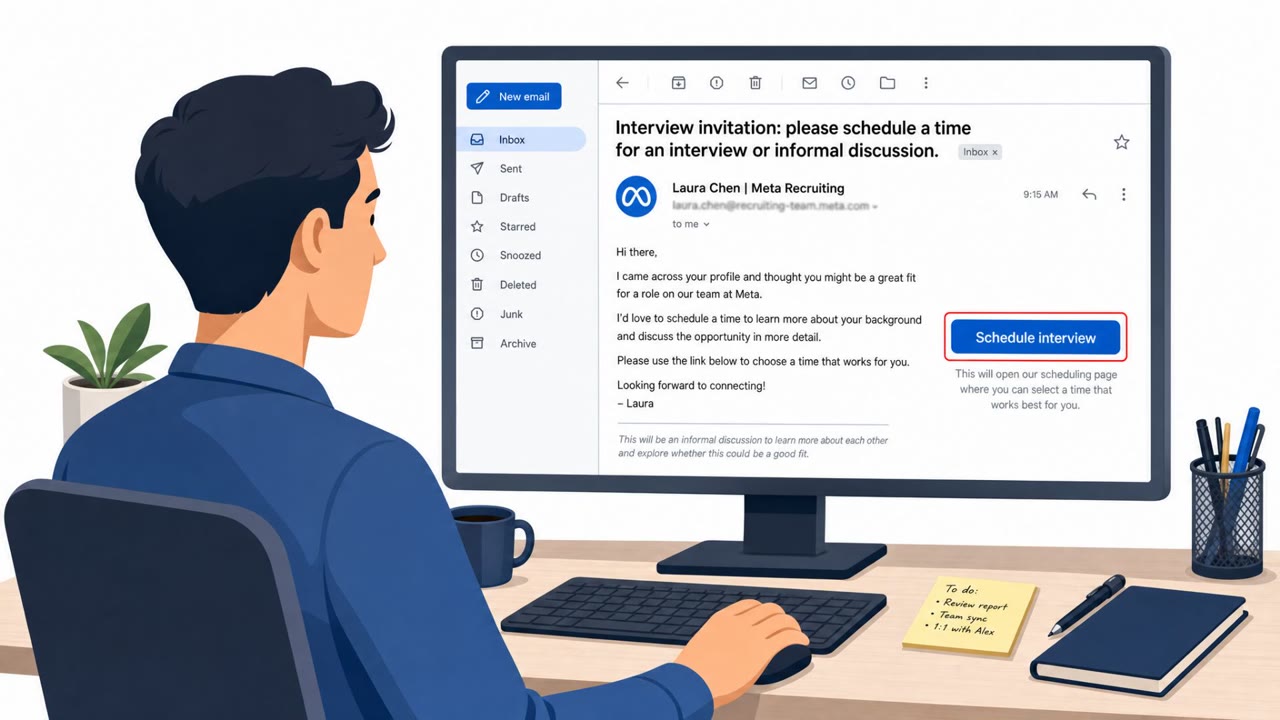
A wave of fake websites impersonates Calendly booking pages for “Meta Careers” job interviews. After victims select an interview time and complete a fake CAPTCHA, the site prompts them to log in to Facebook and then Google, capturing passwords and even two-factor authentication codes in real time. The flow is designed to help attackers immediately take over accounts while the victim is still on the page.
How the attack worked
This campaign used fake websites designed to look like Calendly booking pages for Meta Careers job interviews. Victims who clicked a scheduling link were guided through selecting a 30 minute interview slot, completing a fake CAPTCHA, and then logging into Facebook. If the account had two factor authentication enabled, the page asked for the code from an authentication app, text message, WhatsApp, or email. Visitors were then told that Facebook required them to sign in to Google as well, supposedly for security, and the fake flow asked for a Google password and whatever additional verification step Google requested.
Why it succeeded
The phishing pages were interactive rather than static. They adapted their screens based on what the real Facebook and Google login prompts actually required, allowing attackers to attempt the stolen password on the real site right away and request the matching 2FA code before it expired. When a code failed, the page simply displayed an error message and asked the visitor to try again, keeping victims engaged without raising suspicion. The kit also showed signs of reuse, including version numbers, logging, and a campaign key, and sent captured data to a cloud based API endpoint.
What to watch for
- A scheduling page that asks for a Facebook password or 2FA code, which is not something a real booking flow requires.
- A login window that draws its own address bar inside the page instead of using the browser's genuine address bar.
- A domain that does not match calendly.com or an official Meta careers domain, often following a repeatable naming pattern.
- Repeated prompts for a new authentication code or an unexpected approval request on your phone during what is supposed to be a simple booking process.
How to build resistance
- Treat interview scheduling links as untrusted until the domain is verified, especially if it is not calendly.com or an official company site.
- Never enter a password or MFA code into a booking flow. Only log in directly on the real site you navigated to yourself.
- Rely on the browser's real address bar rather than any address bar drawn inside a page or pop-up.
- Where available, use phishing resistant login methods such as passkeys or hardware security keys, since these are tied to the genuine website and cannot be relayed the same way as codes. These behaviors map to techniques like phishing via service (T1566.002) and credential phishing (T1598).
Key findings
- Attackers impersonate Calendly interview booking pages branded as “Meta Careers” and offer a 30-minute recruiter phone call.
- Victims are guided through a multi-step flow: enter personal details, complete a fake CAPTCHA, then log in to Facebook and provide 2FA codes, followed by a Google sign-in “for security.”
- The phishing pages are interactive and adapt screens based on what the real Facebook/Google login prompts require, enabling near-real-time theft of 2FA codes and approvals.
- The kit appears reusable (version number, logging, ‘campaign key’) and sends captured data to an AWS API Gateway endpoint in the Singapore region.
- The campaign uses multiple lookalike domains that don’t mention Meta or Calendly and follow a repeatable naming pattern (e.g., ‘joinhire’, ‘joinquest’).
Who’s being targeted
- Commonly targeted roles: All employees (general awareness), HR / Recruiting, Marketing / Social Media (Facebook business/admin users), Executives and managers with public profiles, Employees currently job hunting.
- Affected industries: Technology recruiting / job seeking, Any organization whose employees manage Facebook business pages or ad accounts, General public / consumer accounts.
- Attack channels: website.
- Impersonated: Meta Careers recruiter via Calendly, Facebook / Google verification step embedded in the booking site, Meta Careers / embedded Facebook & Google login dialogs.
Red flags to watch for
- A scheduling page asks for your Facebook password and 2FA code (not required to book an interview).
- The login window shows a fake/drawn address bar inside the page rather than the browser’s real address bar.
- The site domain doesn’t match calendly.com or an official Meta careers domain.
- A ‘Meta interview booking’ flow unexpectedly asks for Google credentials.
- Pressure to approve a phone prompt (‘tap Yes’) for a login you didn’t start yourself.
- Reassuring language that contradicts normal security behavior (e.g., ‘Facebook will not share any of your data with your Google Account’).
- Repeated requests for fresh MFA codes during a ‘booking’ process.
- Error loops prompting you to try new codes quickly (attempting to beat expiration).
- You are asked to approve an unexpected sign-in prompt on your phone.
Frequently asked questions
How does the fake Meta Careers Calendly scam work?
Attackers create lookalike Calendly booking pages for Meta job interviews. After picking a time slot and completing a fake CAPTCHA, victims are prompted to log into Facebook and then Google, and the page captures passwords and 2FA codes as they are entered.
Why can attackers bypass two-factor authentication in this attack?
The phishing page is interactive and adapts its prompts based on what the real Facebook or Google login requires, so stolen codes can be used on the real site before they expire.
What are the red flags of this phishing campaign?
Warning signs include a booking page asking for a Facebook password or 2FA code, a fake drawn address bar inside the page instead of the browser's real one, and a domain that does not match calendly.com or an official Meta careers site.
How can employees protect themselves from this type of attack?
Never enter passwords or MFA codes into a scheduling flow, verify unfamiliar recruiting domains independently, rely on the browser's actual address bar, and use phishing-resistant passkeys or hardware security keys where possible.
Read the video transcript
You get a link: “Calendly | Meta Careers – 30‑minute recruiter call.” Looks legit, right? You pick a time, do a fake CAPTCHA, then the page suddenly wants your Facebook password, security code, and even a Google login “for security.” This isn’t scheduling, it’s live credential theft. Here’s the trick: that Facebook and Google “popup” isn’t your browser at all. It’s just a picture of an address bar drawn inside the page, while your passwords and 2FA codes stream straight to an AWS server. If any “Meta interview” link asks you to log in to Facebook or Google, stop. Close it, then open facebook.com or calendly.com yourself and book from there.