The article describes real-world scams where attackers pose as recruiters on LinkedIn and send developers “take-home assessment” code repositories that contain hidden malware triggers. Simply cloning and opening the project in an IDE or coding agent can execute malicious hooks/configs that download an info-stealer to capture credentials. The piece also describes how organizations can use structured AI checks and sandboxing to review untrusted repos more safely.
How the attack works
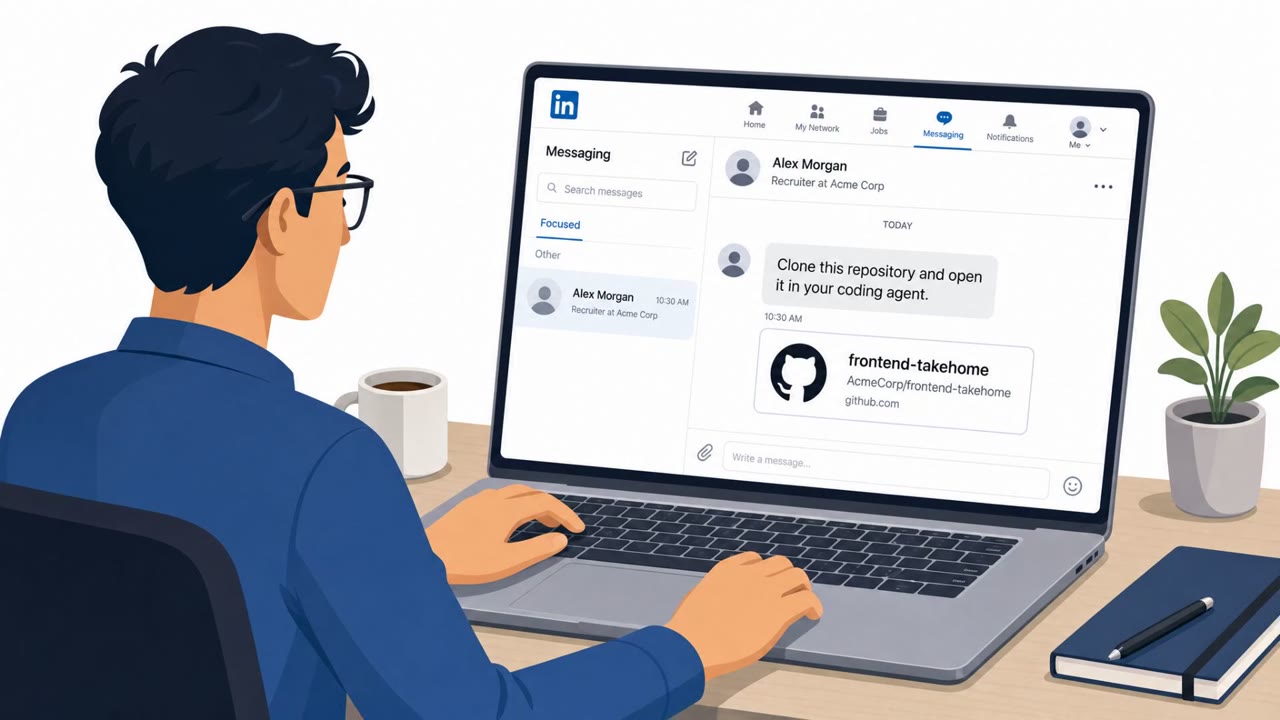
Attackers impersonate recruiters on LinkedIn and reach out to software engineers and developers with an offer to complete a coding interview or take-home assessment. The pretext is convincing because take-home coding tests are a normal part of hiring in tech. The victim is asked to clone a repository and open it locally in an IDE or coding agent to complete the assignment.
The danger is not in reading the code, but in simply opening the project. Malicious repos can include Git hooks, IDE hooks, agent configuration, or package manager hooks (for example in NPM, Cargo, or pip) that execute automatically when the repo is opened, checked out, or when dependencies are installed. This can happen even for developers who casually clone an interesting open-source project they found online, not just those responding to a fake recruiter.
Why this technique succeeds
The attack works because it targets a routine, low-suspicion action: opening code in an editor. Developers are conditioned to trust their tools and their workflow, and many do not realize that the mere act of opening a folder can run code before any file is manually executed. The initial payload is often heavily obfuscated, which helps it evade casual review, and it typically downloads a second-stage payload rather than embedding the full malicious logic up front.
That second stage is commonly an info-stealer designed to collect credentials, or persistent malware that takes instructions from a command-and-control server. Because the compromise can originate from something as ordinary as a take-home assignment or a public GitHub project, victims have little reason for initial suspicion.
What to watch for
- An unsolicited repo link from a recruiter paired with urgency to run or open it locally
- Repo-supplied hooks or configuration files that could execute code automatically on open, checkout, or install
- Obfuscated code, or scripts that fetch and pipe external payloads into execution tools
- Malicious behavior hidden in transitive dependencies rather than the main codebase
Building resistance
Organizations and developers can reduce risk with a few practical habits. Treat unsolicited recruiter coding tests as untrusted content and verify the recruiter and hiring process through a separate, trusted channel before downloading anything. Pay attention to IDE trust dialogs that ask for confirmation before opening an unfamiliar folder, and avoid opening unknown projects directly on a primary workstation.
When suspicious code must be reviewed, doing so inside a locked-down sandbox, such as a microVM, limits the potential damage from hidden hooks or fetched payloads. Combining these habits with awareness of common red flags, like obfuscation and externally fetched payloads, gives developers a better chance of catching a weaponized repository before it can steal credentials or establish persistence.
Key findings
- Attackers pose as LinkedIn recruiters and share “weaponized repositories” under the pretext of coding interviews or take-home assignments.
- The malicious repo can trigger execution when opened in an IDE/agent via repo-supplied hooks/config (e.g., Git hooks, IDE hooks, agent config, package manager hooks).
- Initial code often downloads a second-stage payload, including info-stealers that “vacuum up all your credentials” or malware that talks to a command-and-control (C2) server.
- The article recommends using a structured AI-driven review workflow and running analysis in locked-down sandboxes (e.g., microVMs) to reduce risk.
Who’s being targeted
- Commonly targeted roles: Software Engineers / Developers, DevOps / Platform Engineering, Engineering Managers, IT / Security (developer enablement), Talent / Recruiting teams (process awareness).
- Affected industries: Software development, Technology / engineering teams, Professional services, Any organization employing developers who evaluate external code.
- Attack channels: linkedin, website, github.
- Impersonated: Recruiter / hiring team for a developer role, Legitimate open-source project / maintainer (implied).
Red flags to watch for
- Unsolicited repo sent by a “recruiter” and urgency to run/open it locally
- Repo includes hidden automation (hooks/config) that can run code on open/checkout/install
- Obfuscated code or scripts that fetch external payloads
- Risk occurs even from downloading/opening “source” code from untrusted origins
- Repo-supplied Git/IDE/agent/package-manager hooks can execute code automatically
- Hidden malicious behavior may be buried in transitive dependencies
Frequently asked questions
How do fake recruiter repo scams work?
Attackers pose as recruiters on LinkedIn and send developers a coding interview or take-home assessment repository. When the victim clones and opens the repo in an IDE or coding agent, hidden hooks or config files can trigger execution of malicious code.
What happens after the malicious repo is opened?
The initial payload, often heavily obfuscated, downloads a second-stage payload such as an info-stealer that collects credentials, or malware that communicates with a command-and-control server.
What red flags indicate a repo might be malicious?
Watch for unsolicited repos from recruiters with urgency to run them locally, hidden automation in Git hooks or package manager configs, and obfuscated code or scripts that fetch external payloads.
How can developers protect themselves from these attacks?
Verify recruiters and hiring processes through a trusted channel before downloading anything, respect IDE trust dialogs, and analyze suspicious repos only inside locked-down sandboxes such as microVMs.
Read the video transcript
You get a LinkedIn message from a “recruiter”: “Here’s your take‑home assessment repo, just clone it and run it locally.” Sounds normal, right? But these weaponized repositories hide a nasty little treat. Just opening them in your IDE or coding agent can fire Git hooks or IDE hooks that quietly pull down an info‑stealer and vacuum up all your credentials. Aha moment: the risk starts when you clone, not when you hit run. Even that cool random GitHub project can hide pre-install hooks or obfuscated scripts that fetch a second-stage payload talking to a C2 server. One move: if a recruiter sends you a repo, or a random project looks sketchy, do not clone it on your main machine, run it only in our approved sandbox or microVM, or walk away.