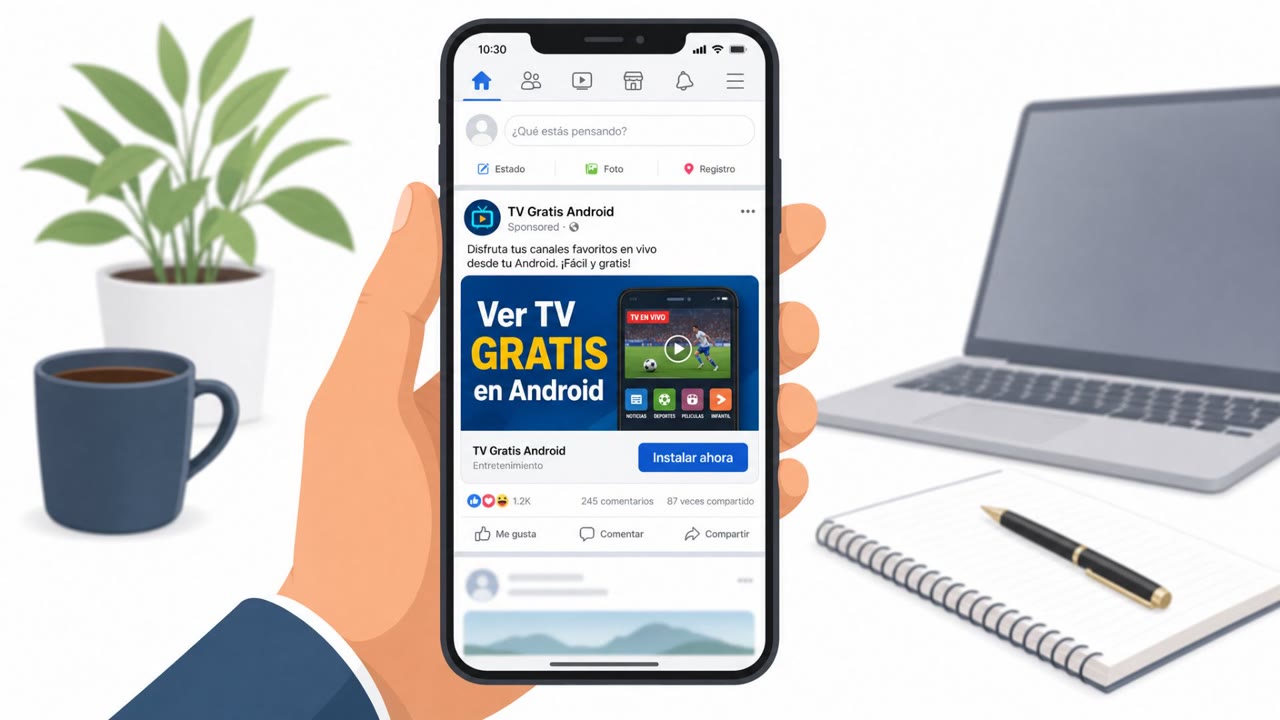
Researchers reported a real malvertising campaign where ads on Meta platforms promoted a fake TV-streaming app to Spanish-speaking users, leading them to sideload an Android app. After victims approved a chain of permissions (including Accessibility), the StreamRat trojan could remotely control the device and steal credentials.
How the attack worked
The StreamRat campaign started with ads on Meta platforms promoting a fake TV-streaming app to Spanish-speaking users. Researchers estimated the campaign was capable of reaching over 570,000 Meta accounts in the EU. Clicking the ad led victims to a crafted website that checked the visitor's operating system and only displayed a download button to Android devices, steering them toward sideloading a file named app.apk instead of using an official app store.
Once installed, the dropper walked victims through a chain of permission requests framed as normal setup steps. It asked to become the device's default Home application, requested a VPN connection before fetching the final payload, and asked for permission to install apps from unknown sources. The final step requested Accessibility access. Once granted, the malware connected to its command-and-control server and gained the ability to capture keystrokes, display credential-stealing overlays, and remotely control the device. StreamRat also used screen-capture methods, including a MediaProjection consent dialog and an Accessibility-based screenshot technique, to observe user activity.
Why it succeeded
The lure worked because it mimicked a familiar, low-friction experience: clicking an ad, visiting a website, and downloading an app to watch streaming content. By tailoring the download prompt specifically to Android visitors and breaking the permission requests into a sequence of small, seemingly reasonable steps, the operators reduced the chance that any single request would raise suspicion. Each permission on its own (Home app, VPN, unknown sources, Accessibility) could be rationalized as part of a normal app setup flow.
What to watch for
- Social media ads that push app downloads outside official app stores, especially links that lead to APK sideloading
- A website that changes its behavior based on whether the visitor is using Android
- An app requesting to become the default Home application
- A request to enable a VPN connection during app installation
- Any request for Accessibility permission from an app that has no legitimate accessibility function
Building resistance
Organizations with BYOD or personal Android device use should reinforce that legitimate apps rarely need Accessibility access, and that installation prompts asking for system-level control unrelated to the app's stated purpose are a strong signal to stop. Awareness efforts should highlight that stopping the install at any point in this chain, especially before granting Accessibility access, prevents the credential theft and remote control capabilities that make StreamRat effective. Treating unsolicited app-download ads and sideloading requests as high risk, regardless of how convincing the pretext, remains one of the most effective defenses against this kind of malvertising-driven attack. Techniques referenced in this campaign map to phishing via social media (attack.mitre.org/techniques/T1566/003), malicious file execution via user interaction (attack.mitre.org/techniques/T1204/002), and impairing device availability or control (attack.mitre.org/techniques/T1656).
Key findings
- A fake TV-streaming campaign on Meta targeted Spanish-speaking users and was estimated to reach 570,950 Meta accounts in the EU.
- The lure drove users to a crafted website that only presented a download button to Android visitors.
- Infection relied on users sideloading an APK and approving multiple permissions (default Home app, VPN, unknown sources, Accessibility).
- After Accessibility permission was granted, operators could capture keystrokes, show credential-stealing overlays, and remotely control the device.
- StreamRat used screen-capture approaches (MediaProjection consent dialog and an Accessibility screenshot method) to observe user activity.
- IoCs shared included app names, package names, file hashes, and two C2 IP addresses.
Who’s being targeted
- Commonly targeted roles: All employees, Android users, BYOD users, IT/Security awareness training audience.
- Affected industries: General consumers, Any organization with BYOD/personal Android devices.
- Attack channels: website.
- Impersonated: A TV-streaming service/app publisher (e.g., 'StrεαmTV Pro'), The fake streaming app installer/setup wizard.
Red flags to watch for
- Being asked to sideload an APK instead of installing from the official app store
- A streaming app requesting system-level controls unrelated to streaming
- A website that only offers the download if it detects Android
- A streaming app asking to become the device’s default Home application
- A request to establish a VPN connection during installation
- A request to enable Accessibility access for a non-accessibility purpose
Frequently asked questions
What is StreamRat?
StreamRat is an Android banking trojan that was promoted to Spanish-speaking users through a fake TV-streaming campaign run via ads on Meta. Once installed, it uses Accessibility permissions to steal credentials and remotely control the device.
How did victims get infected with StreamRat?
A social media ad led users to a crafted website that showed a download button only to Android visitors, prompting them to sideload an APK file named app.apk outside the official app store.
Why is Accessibility permission so risky?
Once Accessibility access is granted, the malware can capture keystrokes, display credential-stealing overlays, inspect the visible interface, and control the device remotely.
What are the warning signs of this type of attack?
Red flags include being asked to sideload an APK, a streaming app requesting to become the default Home app, requests to enable a VPN during setup, and permission requests unrelated to the app's stated purpose.
Read the video transcript
You’re scrolling Meta and see an ad: “Instala StrεαmTV Pro, APK download for Android.” Looks legit, right? Tap it, and a website opens that quietly checks your device. On Android, it shows one big button: download app.apk from outside the app store. During install, this “streaming” app suddenly wants to be your default Home app, start a VPN, allow installs from unknown sources, and get Accessibility access. That’s StreamRat setting up full remote control. Here’s the move: if any “streaming” app asks for Accessibility, Home, VPN, or unknown-sources during install, stop right there and delete the app.