Researchers reported real-world campaigns using two new loaders (WordlistLoader and SynkLoader) to trick employees into running malicious installers or commands. One campaign uses a fake CAPTCHA (“ClickFix”) on compromised websites to get users to paste and run a Windows command; another uses Microsoft Teams messages impersonating an IT Service Desk to convince a user to install an MSI that ultimately steals Windows login passwords via a fake lock screen.
How the attack worked
Two separate loaders, WordlistLoader and SynkLoader, were used in real-world campaigns that relied on social engineering rather than malicious attachments. In the first, compromised but legitimate websites displayed a fake CAPTCHA prompt. When a visitor clicked the "I'm not a robot" checkbox, a malicious command was silently copied to their clipboard, and the page instructed them to paste it into the Windows Run dialog and execute it. Some of these campaigns rotated malicious code through jsDelivr and blockchain-hosted content to avoid takedown.
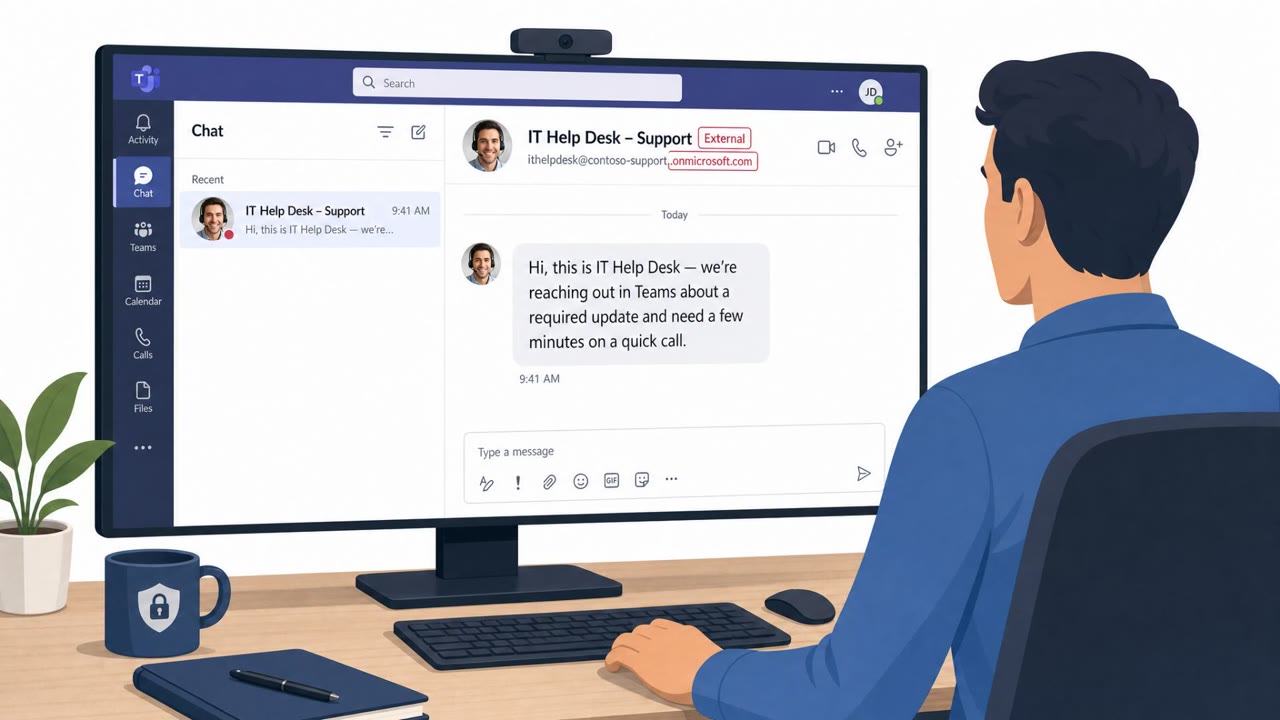
In the second scenario, an attacker impersonating an internal IT Service Desk reached out to a target through a Microsoft Teams message. The message persuaded the user to download and install an MSI installer hosted on a Microsoft Azure blob storage endpoint, a detail that made the file appear to come from Microsoft itself. Once installed, SynkLoader deployed a module called PhishLocker that displayed a fake Windows lock screen to capture the victim's login password.
Why it succeeded
Both scenarios worked by borrowing the appearance of routine, trusted processes. A CAPTCHA is something users complete dozens of times a day without thinking, so an unusual instruction folded into that flow can slip past scrutiny. Likewise, a Teams message from someone claiming to be IT Service Desk exploits the trust employees place in internal support channels. Hosting the installer on a well-known cloud storage domain added a further layer of apparent legitimacy, since the URL looked like it belonged to a Microsoft-hosted resource.
What to watch for
- A CAPTCHA flow that asks you to open the Windows Run dialog and paste a command; legitimate CAPTCHAs never require this.
- Unexpected clipboard activity tied to a "verification" step on a website.
- Unsolicited Teams messages from someone claiming to be IT Service Desk asking you to install software.
- Installer links hosted on generic cloud storage rather than an internal software portal.
- Any unexpected lock screen or re-authentication prompt that appears outside normal login activity.
Building resistance
Employees should be trained to treat CAPTCHA prompts that request command execution as an immediate red flag and to report them rather than comply. IT support requests received over chat should always be verified through an official channel before any software is installed, and staff should understand that a familiar-looking cloud storage domain does not guarantee a file is safe. Finally, any fake lock screen or unusual re-authentication prompt should be reported right away, since it may be an attempt to capture Windows login credentials.
Key findings
- WordlistLoader is delivered via ClearFake campaigns that use the ClickFix/FakeCaptcha technique to trick users into pasting a malicious command into the Windows Run dialog.
- The ClickFix prompts are shown on legitimate-but-compromised websites with injected JavaScript; some campaigns also abuse jsDelivr and blockchain-hosted content (EtherHiding) to rotate malicious code.
- SynkLoader was delivered via Microsoft Teams messages impersonating an “IT Service Desk,” persuading a user to download an MSI from an Azure blob URL to make it look Microsoft-hosted.
- SynkLoader includes a “PhishLocker” module that displays a fake Windows lock screen to capture the victim’s Windows login password.
Who’s being targeted
- Commonly targeted roles: All employees, IT / Service Desk, Security Operations, Helpdesk and endpoint support teams.
- Affected industries: Multiple / cross-industry (any organization using Microsoft 365/Teams and Windows endpoints).
- Attack channels: website, teams.
- Impersonated: Website security / CAPTCHA verification, IT Service Desk.
Red flags to watch for
- A CAPTCHA flow instructs you to open Windows Run and paste a command (CAPTCHAs do not require this).
- Unexpected clipboard copying of a command as part of “verification.”
- Instructions to run system tools/commands to view website content.
- Unexpected Teams chat from “IT Service Desk” urging software installation.
- Installer link hosted on generic cloud storage (blob.core.windows.net) rather than an internal software portal.
- Pressure to install a tool outside normal IT processes/change control.
Frequently asked questions
What is the ClickFix or FakeCaptcha technique?
It is a social engineering trick where a fake CAPTCHA on a compromised website copies a malicious command to the clipboard and instructs the visitor to paste it into the Windows Run dialog and execute it, believing they are completing verification.
How did the Microsoft Teams IT Service Desk scam work?
An attacker impersonating an IT Service Desk contacted a target over Teams and convinced them to download and install an MSI installer hosted on a Microsoft Azure blob storage endpoint, which made the file look like it came from Microsoft.
What does the fake lock screen do?
A module called PhishLocker displays a fake Windows lock screen designed to capture the victim's Windows login password after the malware has already been installed.
Why is this attack considered high sophistication?
It combines legitimate-website compromise, cloud-hosted malicious code, an internal chat channel impersonation, and a credential-harvesting fake lock screen, all without relying on a traditional malicious email attachment.
Read the video transcript
You’re on a normal website, click “I’m not a robot”… and it tells you to run a Windows command. That’s not a CAPTCHA, that’s malware. This is the ClickFix, or FakeCaptcha, trick used by WordlistLoader. Compromised real sites inject JavaScript so when you click the box, a malicious command silently copies to your clipboard and the page walks you through pasting it into Windows Run. Same play in Teams: a chat pops up, “Hi, IT Service Desk here. Please install this PowerShell Cleaner to fix an issue.” The link is an MSI on blob.core.windows.net. If you run it, SynkLoader can drop a fake Windows lock screen, PhishLocker, to capture your login password. Aha moment: real CAPTCHAs and real IT will never tell you to paste commands or install tools from chat. If anything online tells you to do that, stop immediately and report it to IT Security.