A real vishing operation (“Spring Ring”) used fake IT support identities in Microsoft Teams to start chats, then place calls that pressured employees into granting remote access or installing malware. Unit 42 reported the campaign hit 150+ employees across 10+ companies and used believable external Microsoft 365 tenants that looked like internal IT departments.
How the attack worked
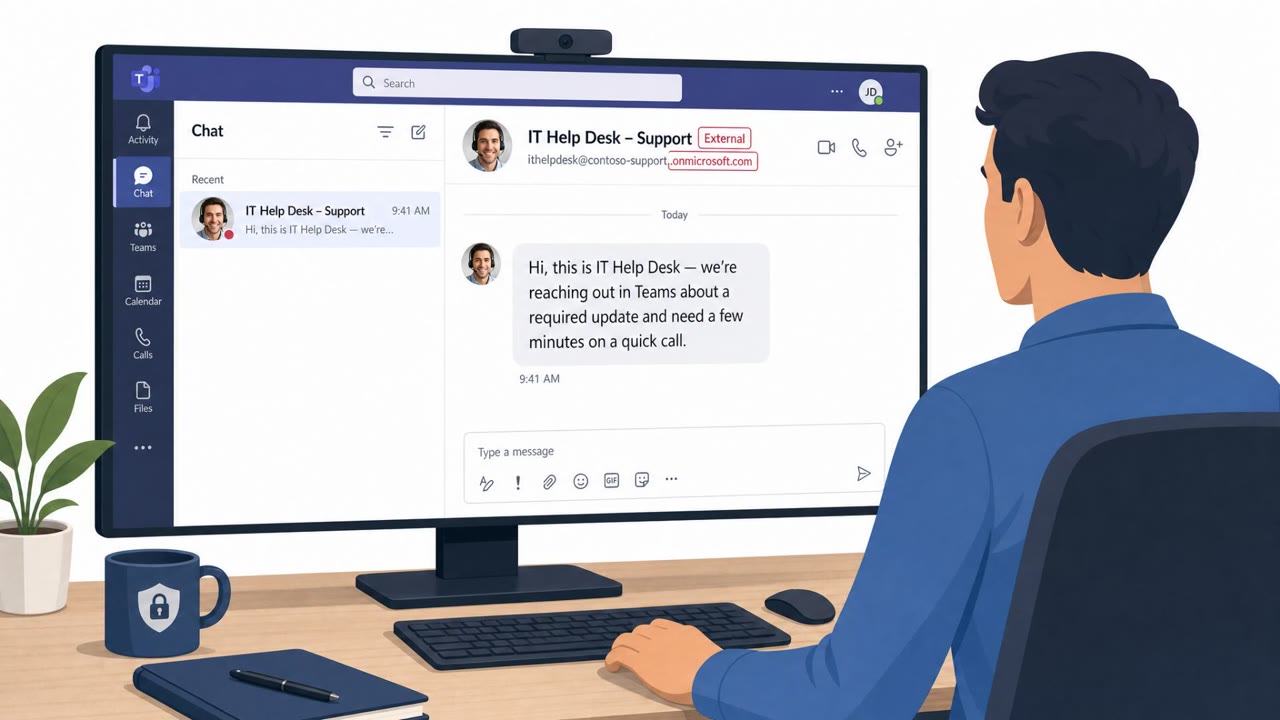
The Spring Ring campaign, active from January to April 2026, relied on external Microsoft Teams tenants built to look like internal IT departments. Names such as "ITProtectionDepartment" and "MandatoryNetworkMonitoring" used the onmicrosoft.com naming format to appear legitimate. The attack began with a Teams chat invite. Once a victim accepted the chat, the attacker placed a call, and successful calls typically lasted 10 to 15 minutes, long enough to build a plausible IT support scenario.
From there, the campaign branched into two intrusion paths. In the first, the caller directed the victim to launch Quick Assist or download remote-support software and hand over control of the machine. Once inside, the attacker ran reconnaissance commands and executed an obfuscated PowerShell script that disabled built-in malware scanning before reaching out to command-and-control infrastructure. In the second path, the caller sent a link to a file hosted on cloud storage, named to include the victim's own company and username. Running that file triggered browser hijacking, scanning of the internal network over SMB, and an attempted NTLM relay attack.
Why it succeeded
The operation targeted more than 150 employees across 10 or more companies, suggesting a repeatable, scalable process rather than a one-off attempt. The combination of a believable external tenant name, an unsolicited chat, and a live phone call added social pressure that static email phishing cannot replicate. Personalizing the malicious file name with the victim's company and username also reinforced a false sense of legitimacy during the call.
What to watch for
- Unsolicited external Teams chats or calls claiming to be internal IT
- External tenant names crafted to sound like internal departments, using the onmicrosoft.com format
- Pressure to install or run remote-support tools, or to hand over remote control
- Links to cloud-hosted files named with your company and username during a support interaction
Building resistance
Organizations should treat unsolicited external Teams chats and calls as high-risk and verify any IT support request through known internal contact methods rather than the caller's provided details. Employees should never install remote-support tools or grant control of a machine based solely on an unexpected helpdesk call. Security teams should also update training and reporting workflows to cover collaboration platforms directly, since phishing alerts tied to these tools accounted for 42% of all phishing alerts in early 2026, up from 30% in the prior four months. Palo Alto Networks' Unit 42 published indicators of compromise, including domains, IPs, and file hashes, which can support detection and blocking efforts tied to this specific activity.
Key findings
- Campaign “Spring Ring” ran January–April 2026 and targeted 150+ employees at 10+ companies.
- Attackers created external Microsoft Teams tenants designed to look like internal IT departments (e.g., “ITProtectionDepartment”, “MandatoryNetworkMonitoring”) using the onmicrosoft.com naming format.
- Workflow: Teams chat invite → victim accepts → attacker places a call; successful calls typically lasted 10–15 minutes.
- Two intrusion paths: (1) victim launches Quick Assist/downloads remote-support tool and grants control; attacker runs reconnaissance commands and executes an obfuscated PowerShell script that disables built-in malware scanning then calls out to command-and-control. (2) victim clicks a cloud-storage link to a file named with their company and username; execution triggers browser hijacking, SMB scanning, and an attempted NTLM relay attack (PetitPotam).
- Unit 42 said collaboration-platform alerts were 42% of phishing alerts in early 2026 (up from 30% in the prior four months).
- Palo Alto Networks published indicators of compromise (domains, IPs, file hashes).
Who’s being targeted
- Commonly targeted roles: All employees, IT/Helpdesk teams, Security operations (for reporting/triage).
- Affected industries: Multiple industries (not specified).
- Attack channels: teams, vishing, website.
- Impersonated: Internal IT department (lookalike external Teams tenant).
Red flags to watch for
- Unsolicited external Teams chat/call claiming to be internal IT
- External tenant names crafted to look internal (onmicrosoft.com)
- Pressure to install/run remote-support tools or hand over remote control
- Unexpected link to download and run a file during a support call
- File name tailored with company and username to create false legitimacy
- Unsolicited external Teams call following a chat request
Frequently asked questions
What was the Spring Ring campaign?
Spring Ring was a vishing operation that ran from January to April 2026, using fake external Microsoft Teams tenants disguised as internal IT departments to target more than 150 employees across 10+ companies.
How did attackers get victims to act?
Attackers sent a Teams chat invite from a lookalike tenant name like ITProtectionDepartment, then placed a call once the chat was accepted, pressuring the victim to grant remote access or open a malicious file.
What happened after victims granted access?
One path led to attackers running an obfuscated PowerShell script that disabled malware scanning and connected to command-and-control; the other path involved a malicious file that triggered browser hijacking, SMB scanning, and an attempted NTLM relay attack.
Why is this harder to catch than email phishing?
Collaboration-platform alerts made up 42% of phishing alerts in early 2026, up from 30%, suggesting many organizations' training and reporting flows still focus mainly on email rather than tools like Teams.
Read the video transcript
You get a Teams ping from “ITProtectionDepartment” and an instant call. Looks like IT, right? That’s the trap. In the real “Spring Ring” campaign, fake IT on external Microsoft 365 tenants chatted, then called for 10–15 minutes, pushing people to open Quick Assist or run a “security” file named with their company and username. Once they get control or you run that file, they can disable malware scanning with hidden PowerShell, hijack your browser, scan the network over SMB, even try NTLM relay attacks like PetitPotam, without ever sending an email. Aha rule: if “IT” calls you on Teams from an external onmicrosoft.com tenant, hang up, don’t click, and contact IT using the internal helpdesk channel you already know.