Researchers found an exposed malware delivery server that contained phishing lures, testing notes, and live delivery logs for an active campaign. The live operation targeted Windows users in Mexico using a fake government ID (CURP) lookup site that triggered a WebDAV-based download flow and delivered an infostealer disguised as a PDF.
How the Attack Worked
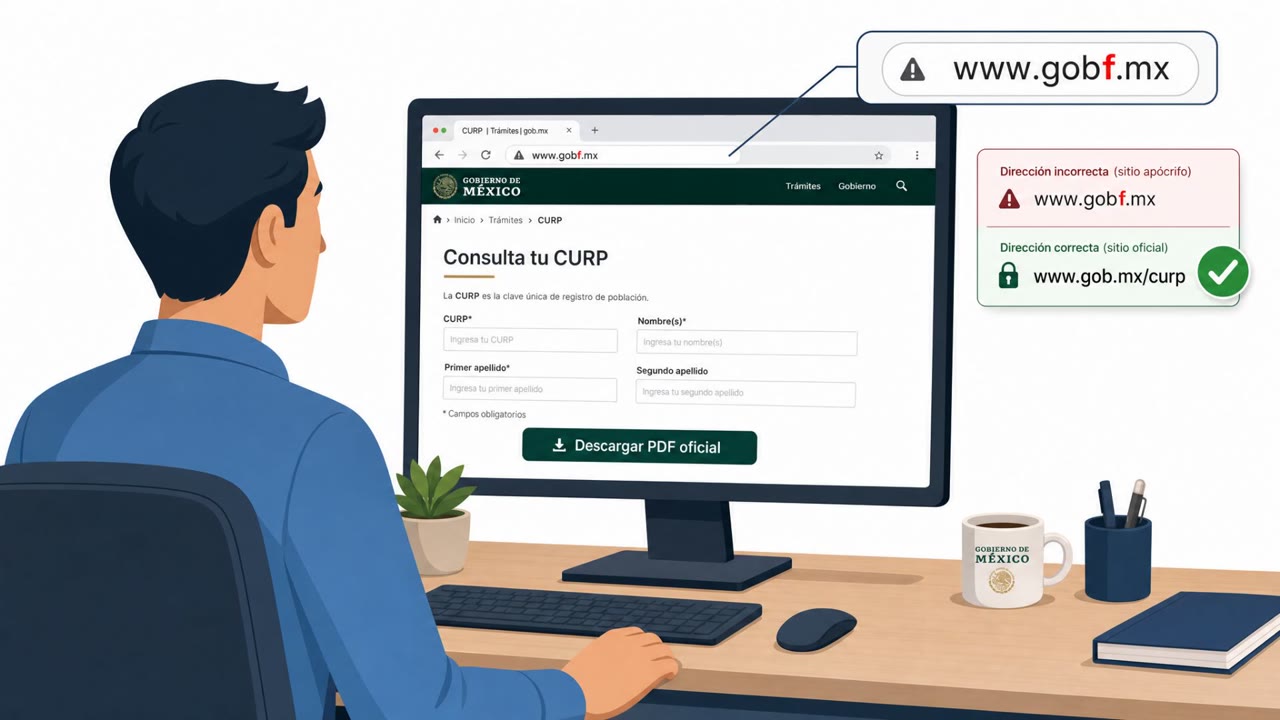
Researchers found an exposed malware delivery server containing a full phishing-to-malware toolkit, including lure templates, testing notes, and live delivery logs for an active campaign. The operation targeted Windows users in Mexico through a typosquatted government ID-lookup domain designed to mimic the official CURP national-ID service. Victims who visited the fake record-retrieval page and clicked a download button did not receive a normal file download. Instead, the click fired a Windows search-ms: query that opened the operator's WebDAV share as an Explorer search window filtered to .scr files.
The File Disguise Trick
The most-delivered lure appeared to be a CURP PDF report but was actually a .scr executable. Its filename was manipulated using a right-to-left override (RTLO) character so that it displayed as if it were a legitimate PDF document. This kind of filename trick relies on victims trusting what they see in a file listing rather than the actual file type, making it easy to mistake an executable for a harmless document.
Why It Succeeded
Several factors combined to make this campaign effective. The lookalike domain closely resembled a trusted government service that people expect to interact with for identity records. The unusual search-ms: download flow diverged from normal browser behavior in a way that many users would not recognize as suspicious. Delivery logs showed activity heavily concentrated in Mexico during working hours, suggesting the campaign was reaching real users rather than only automated scanners. Researchers also assessed that the operator used an LLM-assisted workflow, which may have helped produce more consistent and polished lures at scale.
What to Watch For
- Lookalike or typosquatted domains for government, benefits, or identity-record sites
- Download buttons that trigger unexpected Windows behavior, such as opening a search window instead of saving a file
- Filenames that appear to be documents but use RTLO characters, double extensions, or padding before
.exe or .scr
- File types like
.scr presented as if they were PDFs or other document formats
Building Resistance
Organizations can reduce risk by training staff to verify URLs before downloading anything from ID or record-lookup sites, and by teaching people to pause when a download produces unfamiliar system behavior rather than a normal file save. Awareness efforts should also cover file disguise techniques like RTLO manipulation, since attackers using more capable tooling can make lures look increasingly convincing. The lesson is that professional appearance alone is not a reliable signal of legitimacy, and verification habits matter more as lure quality improves.
Referenced technique: attack.mitre.org/techniques/T1204/002/
Key findings
- An exposed server revealed a full phishing-to-malware delivery toolkit (lure templates, tests, notes, and live delivery logs).
- An active campaign targeted Mexican users via a typosquatted government ID-lookup domain and a fake record retrieval page.
- The download flow used a Windows WebDAV mechanism triggered by a `search-ms:` query, leading victims to a WebDAV share with executable lures.
- A common lure impersonated a CURP PDF report but delivered a disguised `.scr` executable using right-to-left override (RTLO).
- Rapid7 assessed the operator used an LLM-assisted workflow, likely leveraging an open-source AI coding agent.
- Delivery logs showed heavy Mexico concentration during working hours, suggesting real-user targeting rather than only scanning.
Who’s being targeted
- Commonly targeted roles: All employees, Helpdesk / IT support, HR (often handles identity/record checks), Finance (high-value credential targets), Executives (high-risk targets for follow-on compromise).
- Affected industries: Government services (citizen ID/records portals), General public / consumers (Windows users), Technology (software and security vendors referenced).
- Attack channels: website.
- Impersonated: Mexican government CURP national-ID lookup service, CURP record/report issuer.
Red flags to watch for
- Lookalike/typosquatted government domain
- Unusual download behavior that opens Windows search (search-ms) instead of a normal PDF download
- File appears to be a PDF but is actually an executable (e.g., .scr) using filename tricks
- Right-to-left override (RTLO) filename trick to appear as a PDF
- Executable file type (.scr) presented as a document
- Unexpected installer behavior for a supposed PDF (e.g., prompts, unpacking)
Frequently asked questions
How did the fake CURP website deliver malware?
The lookalike site's download button fired a search-ms query that opened the operator's WebDAV share as a Windows Explorer search filtered to .scr files, rather than delivering a normal PDF download.
How was the malicious file disguised as a PDF?
The most-delivered lure was a .scr executable whose filename was flipped using a right-to-left override (RTLO) so it displayed as if it were a PDF report.
What made this campaign more sophisticated than typical phishing?
An exposed server revealed lure templates, testing notes, and live delivery logs, and researchers assessed the operator used an LLM-assisted workflow to build the toolkit.
What should employees watch for based on this attack?
Verify URLs on government or ID-lookup sites before downloading anything, be suspicious of download buttons that trigger unusual Windows search behavior, and check filenames for RTLO characters, double extensions, or padding before .exe or .scr.
Read the video transcript
Imagine you’re checking your CURP and the site looks official… but one click turns into a malware download. On this fake gobf.mx CURP page, the “Download CURP PDF” button doesn’t give you a file. It silently fires a search-ms link and pops open a Windows Search window pointed at a WebDAV folder full of “reports.” Here’s the nasty part: the “CURP report.pdf” in that window is actually a .scr program, using a filename trick so the extension appears reversed. Open it, and an infostealer runs in memory, grabbing browser passwords, crypto wallets, and Telegram sessions. If a government “PDF” opens Windows Search or shows anything but .pdf as the file type, stop and close it, then report it to Security immediately.