Researchers found macOS users being tricked into installing a fake Zoom app that actually installs a persistent backdoor called CloudSyncD. The installer guides the victim through a normal-looking setup and prompts for the user’s password so it can run with elevated privileges and stay on the Mac long term.
How the attack worked
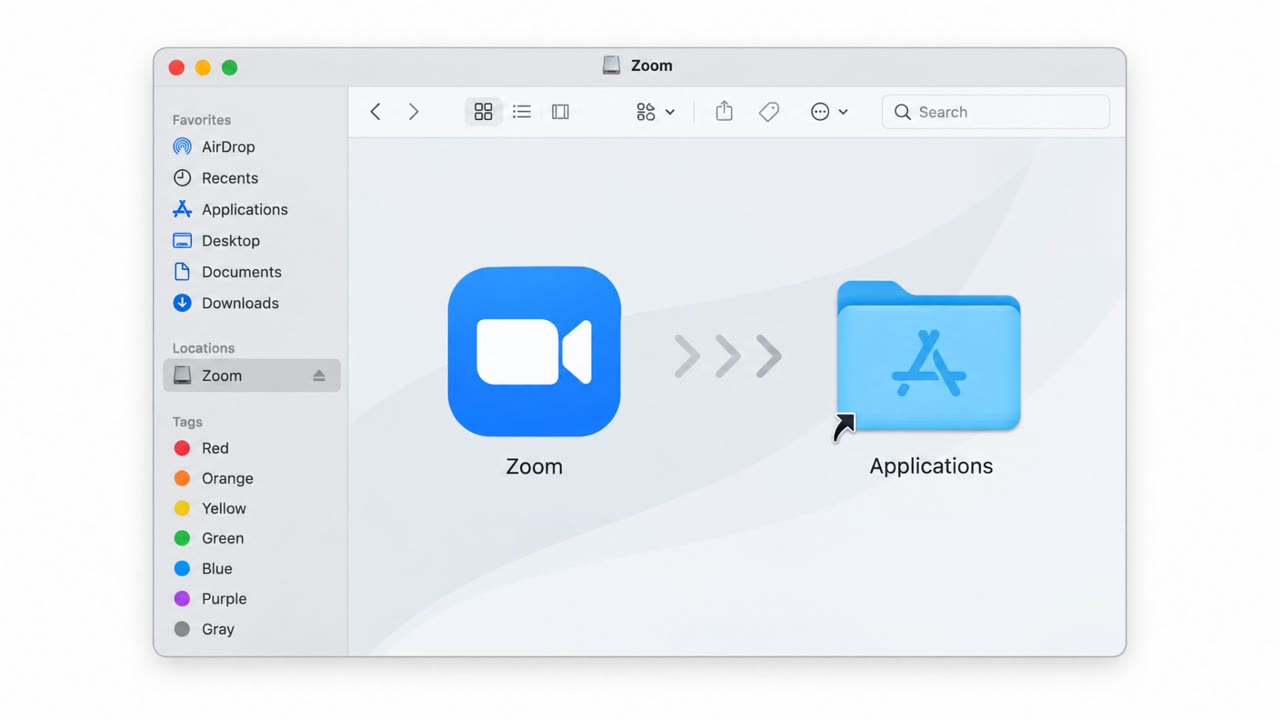
Attackers distributed a macOS installer disguised as Zoom. When opened, the disk image mounts as a volume named Zoom and walks the victim through what appears to be a routine installation process. Instead of installing the real conferencing app, the process installs a persistent backdoor called CloudSyncD. The dropper is designed to only trigger when the victim actively participates in the activation steps, which is why the disguise as a familiar, trusted app like Zoom matters so much to the attacker.
The password prompt is the real trap
A central part of this attack is a prompt for the user's macOS password during what looks like a normal app setup. The dropper uses that password with sudo to write and execute the payload to disk when direct execution would otherwise be blocked by macOS security protections. This step depends entirely on the victim treating the password request as a normal part of installing Zoom rather than recognizing it as unusual.
Why it succeeds
This campaign relies on standard social engineering rather than a technical exploit of Zoom itself. The installer looks and behaves enough like a legitimate setup flow that victims proceed through each step, including entering credentials, without pausing to question the source. Once CloudSyncD is installed, it establishes persistence through a daemon and communicates with attacker infrastructure while disguising its traffic to resemble an ordinary JavaScript fetch, such as a jQuery script, making the activity harder to flag through casual observation of network behavior.
What to watch for
- Installers obtained from sources other than the official vendor site, App Store, or an approved internal software portal
- Any unexpected request to enter your macOS password during what should be a simple app installation
- Disk images or installer behavior that doesn't match the normal, known installation flow for an app like Zoom
- Unusual background network activity that resembles common scripts but originates from a newly installed app
Building resistance
Organizations can reduce exposure by reinforcing a few habits across all macOS users, not just technical staff. Employees should be trained to install common software only from approved sources and to treat any install-time password prompt as a signal to pause and verify with IT before continuing. Because this technique still depends on tricking a person into handing over a password, awareness training that specifically covers fake installer scenarios, combined with clear reporting channels for suspicious downloads, directly addresses the weak point this campaign exploits across finance, HR, executive, and general staff roles alike.
Key findings
- Malware was delivered as a Zoom-branded macOS installer (disk image) to trick users into running it.
- The mounted disk image appears as a volume named "Zoom" and the user is guided through activation as if installing Zoom.
- The dropper can prompt for the user’s password and use it with sudo to execute the payload when macOS protections block direct execution.
- CloudSyncD establishes persistence via a daemon and communicates with attacker-controlled infrastructure while trying to look like normal web traffic.
- The campaign progressed from development/testing to active deployment across multiple domains.
Who’s being targeted
- Commonly targeted roles: All employees (macOS users), IT/Helpdesk, Executives/Assistants, Finance, HR.
- Affected industries: Any organization with macOS users (cross-industry).
- Attack channels: website.
- Impersonated: Zoom (fake Zoom Mac installer).
Red flags to watch for
- Installer obtained from an untrusted/non-official download source
- Unexpected prompt to enter your password during a basic app install
- Disk image/installer behavior doesn’t match normal Zoom installation (e.g., odd prompts, unusual volume/app details)
Frequently asked questions
How does the fake Zoom installer infect a Mac?
The malware is delivered as a disk image that mounts as a volume named Zoom, guiding the victim through what looks like a normal installation while actually installing the CloudSyncD backdoor.
Why does the fake installer ask for my password?
The dropper prompts for the user's macOS password so it can use sudo to execute the payload with elevated privileges when normal execution is blocked by macOS protections.
How does CloudSyncD stay hidden on an infected Mac?
It establishes persistence through a daemon and communicates with attacker-controlled infrastructure by masquerading as a jQuery script so its network traffic resembles an ordinary JavaScript fetch.
Who is at risk from this campaign?
Any organization with macOS users is affected, including all employees, IT and helpdesk staff, executives, finance, and HR.
Read the video transcript
You’re on a website that says, “Download Zoom for Mac (Installer).” Looks normal, right? This is where the trap starts. You download a Zoom-branded disk image. It mounts as a volume named “Zoom,” walks you through a normal-looking setup, then suddenly asks for your macOS password to ‘complete activation.’ That’s the CloudSyncD backdoor installer, not Zoom. Type your password there, and the dropper uses sudo to plant a persistent daemon called CloudSyncD. It phones home over the network, masquerading as normal web traffic, like a jQuery script quietly fetching data in the background. Here’s the move: if you’re installing Zoom or any common app and see an unexpected password prompt, stop and don’t type it, contact IT and ask, “Is this installer legit?”