Researchers described an active phishing operation using real DocuSign notifications to trick employees into opening a fake “remittance-advice” document and clicking a hidden malicious link. The attack routes victims through legitimate Microsoft/Google pages before landing on an adversary-in-the-middle proxy that captures passwords and MFA codes to hijack Microsoft 365 sessions. A separate campaign in Cambodia also uses targeted phishing emails with localized lures (government notices, public health, dental records) to deliver malware.
How the attack worked
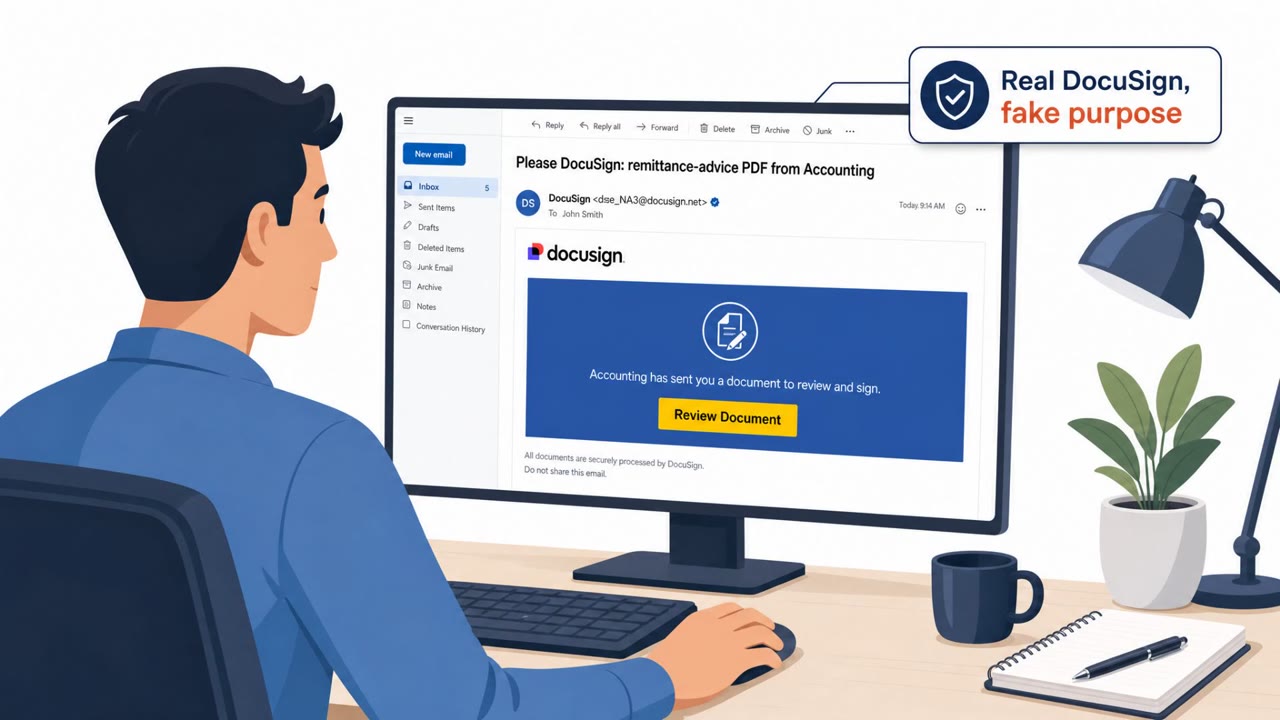
This campaign, described as a subscription phishing service called NovaCookies, systematically targets corporate networks to steal authenticated Microsoft 365 sessions. Instead of sending an obviously fake email, the operation abuses genuine DocuSign notifications and places the malicious link inside the shared document itself. The lure tells recipients that an accounting department shared a remittance-advice PDF, prompting the user to open it. Clicking through does not go straight to a fake login page. Instead, an OAuth error-redirect technique guides the browser through legitimate Microsoft or Google endpoints before finally routing to attacker infrastructure, an adversary-in-the-middle proxy that captures both passwords and MFA codes in real time.
Why it succeeded
Several design choices make this scheme effective. Using a real DocuSign notification means the initial message can bypass many email and gateway checks that look for spoofed sender domains or malformed links. The payment-related pretext, a remittance advice from accounting, targets a task finance and accounts payable staff handle routinely, making the request feel mundane rather than suspicious. The multi-hop redirect through trusted Microsoft and Google pages before reaching the final phishing page adds a layer of perceived legitimacy that a single suspicious URL would not provide.
What to watch for
- An unexpected DocuSign share notification involving payments, invoices, or remittance advice
- A login flow that bounces through multiple recognizable sites before landing on a final sign-in page
- Lookalike domain patterns, such as alternating-case subdomains registered on unusual top-level domains, designed to resemble Microsoft portals
- Being asked to enter both a password and an MFA code immediately after opening a shared document link
A separate campaign highlighted in the same report targets Cambodia-based staff with localized lures, including government notices, public health announcements, and dental records, delivered as compressed archive attachments that lead to malware installation when opened.
How to build resistance
Organizations can reduce exposure by training finance, accounting, and accounts payable staff, along with executive assistants who often receive payment documents, to verify unexpected document shares through a separate known channel before opening them. Users should be encouraged to pause when a login process redirects through several sites rather than going directly to a familiar sign-in page. Because this attack targets session tokens and MFA codes directly, phishing-resistant authentication methods and close monitoring for suspicious session activity are valuable complements to user awareness training.
Key findings
- NovaCookies is described as a subscription phishing service that "systematically targets corporate networks to steal authenticated Microsoft 365 sessions" using an adversary-in-the-middle proxy.
- Attackers abuse "genuine DocuSign notifications" and place the malicious link inside the shared document so it can bypass many email and gateway checks.
- The lure claims "an accounting department shared a remittance-advice PDF" and prompts the user to open it.
- The click path uses "an OAuth error-redirect technique" through legitimate Microsoft/Google endpoints before routing to attacker infrastructure to maintain trust.
- Affiliates register landing pages on "`.vu` domains" and use lookalike subdomains (example given: "PwPt-sHaRe") to resemble Microsoft.
- A separate Cambodia-focused campaign uses "targeted phishing emails" with lures such as "Cambodian government notices, public health announcements, and dental records" to deliver Spark RAT.
Who’s being targeted
- Commonly targeted roles: Finance/Accounting/AP, All Microsoft 365 users, Executive assistants (often receive payment documents), Cambodia-based staff and regional offices.
- Affected industries: Cross-industry corporate environments using Microsoft 365, Government (Cambodia), Healthcare/public health (Cambodia-themed lures).
- Attack channels: email, website.
- Impersonated: DocuSign (using a real DocuSign notification) and an internal Accounting department sender, Cambodian government/public health office/dental clinic (varies by lure).
Red flags to watch for
- Unexpected DocuSign share involving payments/remittance advice
- Login flow that “bounces” across multiple sites before reaching the final page
- Lookalike domain patterns such as alternating-case subdomains on a .vu domain
- Unexpected compressed archive attachment
- Pressure/importance implied by “government notice” or “health announcement” theme
- Installer execution request from an email sender
Frequently asked questions
How does the DocuSign phishing attack work?
Attackers embed a malicious link inside a genuine DocuSign notification claiming an accounting department shared a remittance-advice PDF, then route victims through legitimate Microsoft and Google pages before landing on an attacker-controlled page that captures credentials and MFA codes.
Why does this attack bypass typical email security checks?
Because the malicious link is placed inside a real DocuSign notification and the login flow uses an OAuth error-redirect technique through legitimate Microsoft and Google endpoints, the traffic looks trustworthy to many email and gateway checks.
What are the warning signs of this scheme?
Red flags include an unexpected DocuSign share tied to payments or remittance advice, a login process that bounces across multiple sites before reaching a final page, and lookalike domains such as alternating-case subdomains on a .vu domain.
Is this the same as the Cambodia-focused campaign mentioned in the report?
No, it is a separate campaign that uses localized lures such as Cambodian government notices, public health announcements, and dental records to deliver malware through compressed archive attachments.
Read the video transcript
You get a real DocuSign email: “Accounting shared a remittance-advice PDF.” Looks routine, right? You open the PDF, click the link, and the login bounces through Microsoft and Google pages before a perfect-looking Microsoft 365 sign-in. Behind that, a NovaCookies phishing proxy is stealing your password and MFA in real time. Two tells: the login “hops” across multiple sites, and the final address is weird, like PwPt-sHaRe.something.vu instead of microsoft.com. Same idea in Cambodia: urgent government or health emails pushing a ZIP file and installer. If a DocuSign share or “official” notice is unexpected, stop. Don’t click links or run files, call or message the sender using a known contact and confirm first.