Researchers reported a real scam campaign where criminals pose as employers on Indeed, then pressure applicants to install a fake “interview” Android app. The app impersonates Indeed’s login, requests powerful permissions, and acts as a Trojan dropper that installs spyware on the victim’s phone.
How the Attack Worked
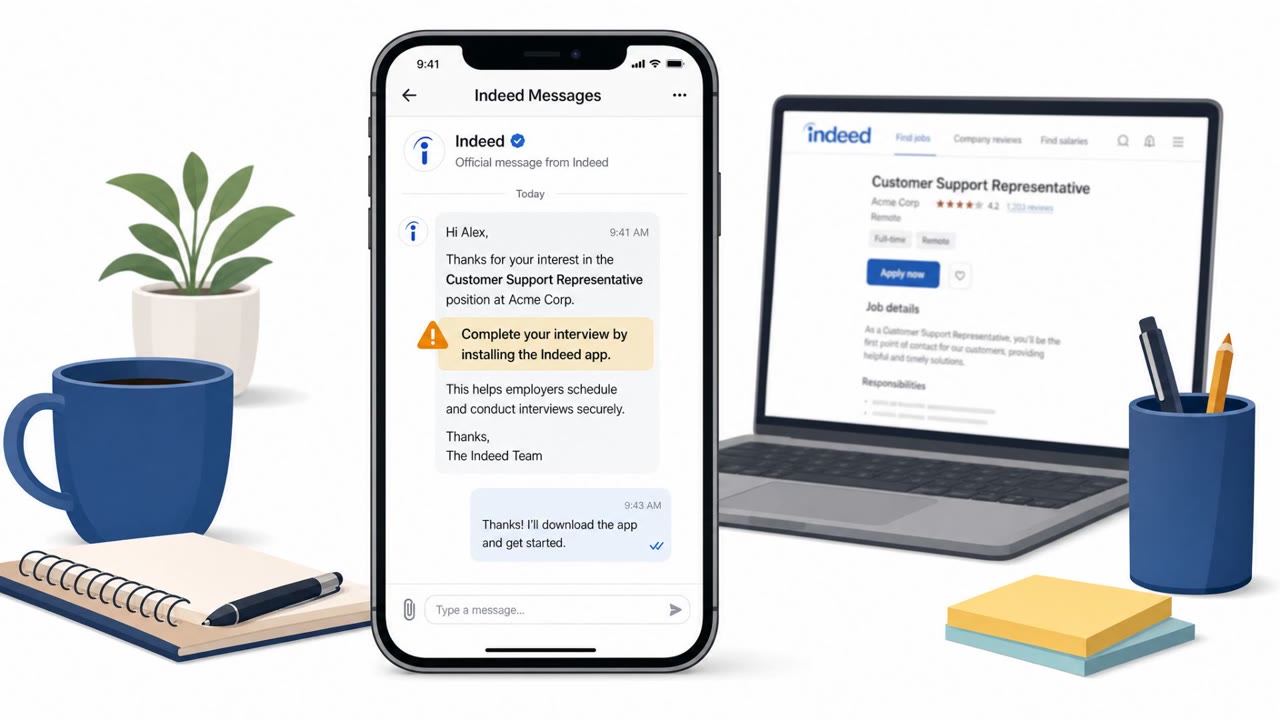
The scam begins with fake job listings on Indeed, where criminals pose as employers or recruiters to start conversations with applicants. Once trust is established, victims are directed to install an "interview" Android app, often distributed as a sideloaded APK rather than through an official app store. The pretext varies: identity verification, an application update, or access to a recruitment portal.
Once installed, the app impersonates Indeed's login page and prompts the victim to enter an email address. After that, it creates a VPN connection and functions as a Trojan dropper, delivering spyware onto the device. The malware also seeks Android's Accessibility permission, which can grant extensive control over the phone and even interfere with the victim's ability to uninstall the app.
Why It Succeeded
This campaign works because it borrows credibility from a platform job seekers already trust. Conversations start on Indeed, a familiar and legitimate job site, which lowers suspicion before the malicious request ever appears. Combining that trust with the natural urgency of a job opportunity or interview process pushes applicants toward installing an app without pausing to verify it. Because the login screen inside the app mimics Indeed's own branding, victims may not realize they are entering credentials into a hostile application rather than the real platform.
What to Watch For
- Being asked to install an APK or sideload an app instead of using an official app store
- App names suggesting an unofficial Indeed product, such as an "Indeed Interview" app
- Pressure framed around urgency to proceed with hiring or an interview
- A login screen appearing inside an unfamiliar app rather than Indeed's official apps
- Unexpected requests for Accessibility permission or a VPN connection
Building Resistance
Job seekers and mobile users should treat any request to install an interview app, especially via APK, as a stop-and-verify moment, even when the conversation started on a trusted platform. Rather than following a recruiter's link, open Indeed or the employer's official website directly to confirm the listing and company. Mobile users should be trained to question apps that request Accessibility permissions or unexpected VPN access, since these are uncommon and high-risk requests for a legitimate interview tool. If a suspicious app was already installed, the device should be treated as potentially compromised: change passwords from a separate trusted device and review account security and MFA settings. Building these habits into routine job-search behavior reduces the chance that platform trust can be turned into a malware delivery path.
Key findings
- Attackers posed as employers/recruiters on Indeed and used fake job listings to start conversations with applicants.
- Victims were directed to install a fake Android “interview” app (often via an APK), framed as identity verification, an update, or access to a recruitment portal.
- The fake app impersonated an Indeed login page, created a VPN connection after collecting an email address, and acted as a Trojan dropper that delivered spyware.
- The malware sought Android Accessibility permission, which could allow extensive control and even interfere with uninstalling the app.
Who’s being targeted
- Commonly targeted roles: All employees (mobile users), HR/Recruiting, Talent acquisition teams, Anyone job hunting or using job platforms.
- Affected industries: Cross-industry (job seekers / individual consumers).
- Attack channels: website.
- Impersonated: Employer/recruiter communicating via Indeed, Indeed (fake ‘Indeed’ login inside the app).
Red flags to watch for
- Asked to install an APK / sideloaded app instead of using Google Play
- App name suggests an unofficial Indeed product (e.g., “Indeed Interview”)
- Request is framed as urgent to proceed with hiring
- Login occurs inside an unfamiliar app rather than the official Indeed apps
- Unexpected VPN connection request
- Accessibility permission request from an interview app
Frequently asked questions
How does the fake Indeed interview app scam work?
Scammers pose as employers on Indeed and, after engaging applicants, direct them to install an interview app framed as identity verification, an update, or portal access. The app impersonates Indeed's login page, sets up a VPN connection, and acts as a Trojan dropper that installs spyware.
What permissions should raise red flags on a job related app?
Requests for Android Accessibility permission and unexpected VPN connections are major warning signs, since Accessibility access can allow extensive control over a device and even interfere with uninstalling the app.
What should someone do if they already installed the fake app?
Treat the phone as potentially compromised, use a separate trusted device to change passwords, and review accounts and MFA settings.
How can job seekers verify a recruiter is legitimate?
Verify the request independently by opening Indeed or the employer's official website directly rather than following a link sent by the recruiter.
Read the video transcript
You apply on Indeed, a “recruiter” messages: “Please install an interview app to complete your interview.” Sounds legit, right? Here’s the trick: scammers post fake jobs on Indeed, then push an Android APK called something like “Indeed Interview.” It opens a fake Indeed login, then silently sets up a VPN and drops spyware. Aha moment: Indeed says there are only two real apps, Indeed Job Search and Indeed Flex. If an “Indeed Interview” app wants VPN or Accessibility access, it’s not hiring you, it’s hijacking your phone. Your move: if any recruiter tells you to install an interview APK, stop and verify by opening Indeed or the employer’s official site yourself, never from their link.