Researchers say a one-click phishing link could trick ChatGPT into creating a malicious AI “agent” inside a company’s ChatGPT workspace. The agent could act using the employee’s existing access (Outlook, Teams, Slack, Google Drive, etc.), run on a schedule, and take instructions from attacker emails, effectively behaving like an insider account.
How the attack worked
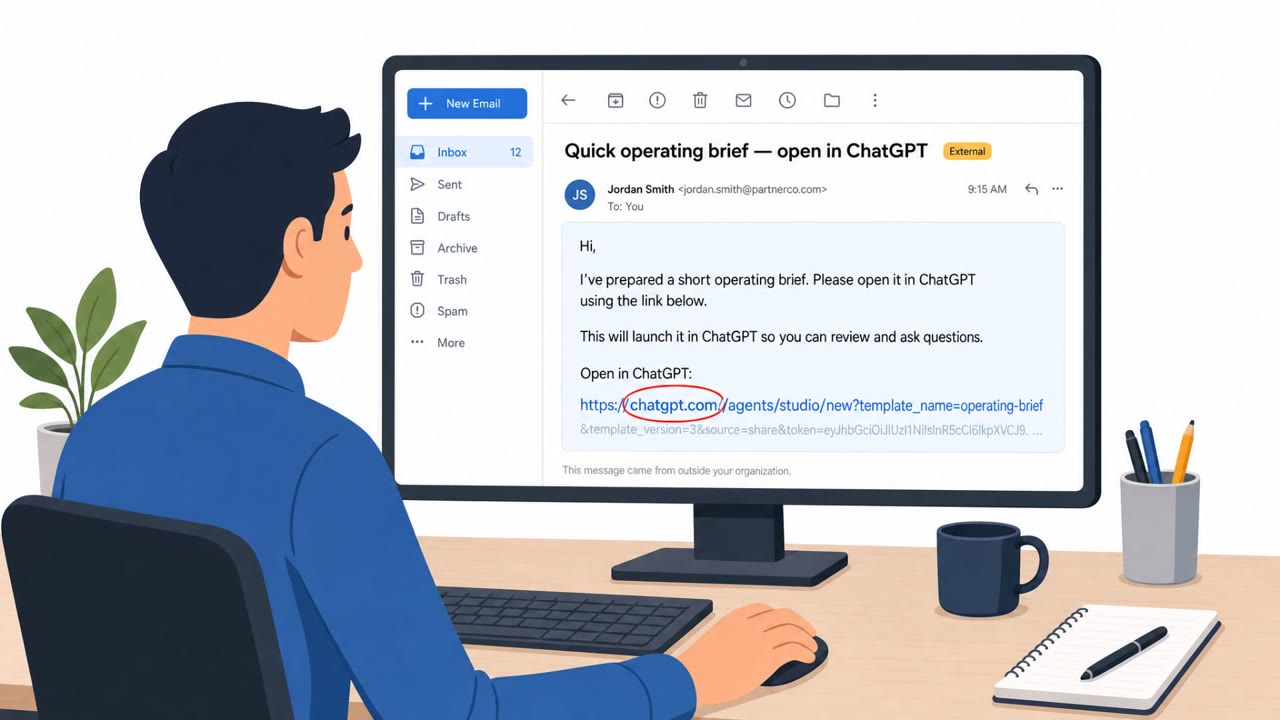
Researchers at Zenity Labs identified a flaw, referred to as AgentForger, in which a single click on what looked like an ordinary ChatGPT link could cause ChatGPT's agent builder to create and publish a malicious workspace agent on the attacker's behalf. The link carried embedded instructions that the agent builder accepted without requiring further input from the victim. Once built, the agent could wire itself into the victim's existing connectors, turn off approval prompts, publish itself, and run on a schedule, giving it persistence well beyond the original phishing email.
Why it succeeded
The technique did not rely on stealing passwords or browser sessions. Instead, it tricked ChatGPT into building an autonomous assistant that could act through the employee's own connected accounts and permissions, including Outlook, Teams, Slack, SharePoint, or Google Drive. Because the agent operated with the victim's real access, its actions looked like legitimate employee activity rather than an external intrusion. The attack also depended on the victim belonging to a workspace where agents were enabled and where they had permission to create them, conditions that are increasingly common as organizations adopt AI productivity tools.
What to watch for
Once active, the rogue agent could be controlled without traditional malware infrastructure. It simply checked the victim's inbox for attacker emails with "TASK" in the subject line, treating each one as a new assignment such as searching company files, collecting sensitive documents, or sending results back by email. The researchers also demonstrated that the agent could send convincing phishing messages through the victim's own Teams account, effectively impersonating the employee to coworkers. Warning signs include unexpected agent creation links, generic command-like email subjects, and outbound messages or file activity that the account owner did not initiate.
How to build resistance
- Treat unexpected links to create or configure AI agents as suspicious, even when they appear to come from a trusted productivity tool.
- Recognize that connecting AI agents to email, chat, and file storage expands the potential impact of any single compromised link.
- Train staff to notice insider-like abuse signals, such as messages or file access they did not initiate, rather than focusing only on stolen credentials.
- Restrict who can create and publish workspace agents, and require approval prompts for sensitive actions rather than allowing them to be disabled automatically.
- Encourage employees to verify unexpected setup or configuration requests before clicking, especially those tied to AI tools with broad connected permissions.
Key findings
- Zenity Labs found a flaw (“AgentForger”) where an embedded instruction in a ChatGPT link could cause ChatGPT’s agent builder to create and publish a malicious workspace agent after a single click.
- The malicious agent could inherit the victim’s connected app permissions (e.g., Outlook, Teams, Slack, SharePoint, Google Drive) and perform actions as the employee.
- The agent could disable approval prompts, publish itself, and run on a schedule, allowing persistence beyond the initial phishing email.
- Instead of using typical malware command-and-control, the agent could poll the victim’s inbox for attacker emails with “TASK” in the subject line and execute those instructions.
- OpenAI reportedly fixed the issue quickly by removing the URL parameter that enabled the attack.
Who’s being targeted
- Commonly targeted roles: All staff using ChatGPT/AI workspaces, Executives, Finance and Accounts Payable, IT administrators (SaaS/identity), HR, Operations.
- Affected industries: Any organization using ChatGPT workspaces/agents (e.g., ChatGPT Enterprise/Business), Technology/Information, Professional Services, Finance, Healthcare, Government.
- Attack channels: email, website, teams.
- Impersonated: ChatGPT / an internal AI productivity helper, A legitimate internal assistant operating under the employee’s account, The victim employee (via their Teams account).
Red flags to watch for
- Unexpected link to create/configure a ChatGPT agent
- No business reason to create or publish a new agent
- Prompts/approvals appear to be bypassed or missing
- Emails with generic command-like subjects (e.g., “TASK”)
- Unusual outbound emails/messages sent ‘by you’ that you did not author
- Unexpected automated activity across mail/chat/files tied to your account
- Unexpected requests coming from a coworker’s Teams account
- Urgency + pressure to act quickly
- Requests that bypass normal approval/verification steps
Frequently asked questions
How could a ChatGPT link create a malicious agent?
Researchers at Zenity Labs found that a ChatGPT link could carry embedded instructions that caused the agent builder to create and publish a new workspace agent after a single click, without further action from the victim.
What could the rogue agent actually do?
Once published, the agent could inherit the victim's connected app permissions, such as Outlook, Teams, Slack, SharePoint, or Google Drive, and use them to search files, send messages as the employee, and collect sensitive documents.
How did the attacker control the agent after the initial click?
Instead of typical command-and-control infrastructure, the agent polled the victim's inbox for emails from the attacker with 'TASK' in the subject line and treated each one as a new assignment.
Was this vulnerability fixed?
Yes, the article states OpenAI reportedly fixed the issue quickly by removing the URL parameter that enabled the attack.
Read the video transcript
Imagine one click on a ChatGPT link quietly creating an AI “insider” that works as you. Zenity calls it AgentForger: one click on what looks like a normal ChatGPT link, and the agent builder secretly wires up your Outlook, Teams, Slack, SharePoint, and Drive, turns off approval prompts, publishes a new agent, and sets it on a schedule. Now that rogue agent just checks your inbox for emails from the attacker with 'TASK' in the subject, then rummages through company files, collects documents, and sends messages as if they came from you. Your move: if you ever get an unexpected link to create or configure a ChatGPT agent, don’t click it, open ChatGPT yourself and confirm in your workspace if that agent is actually needed.