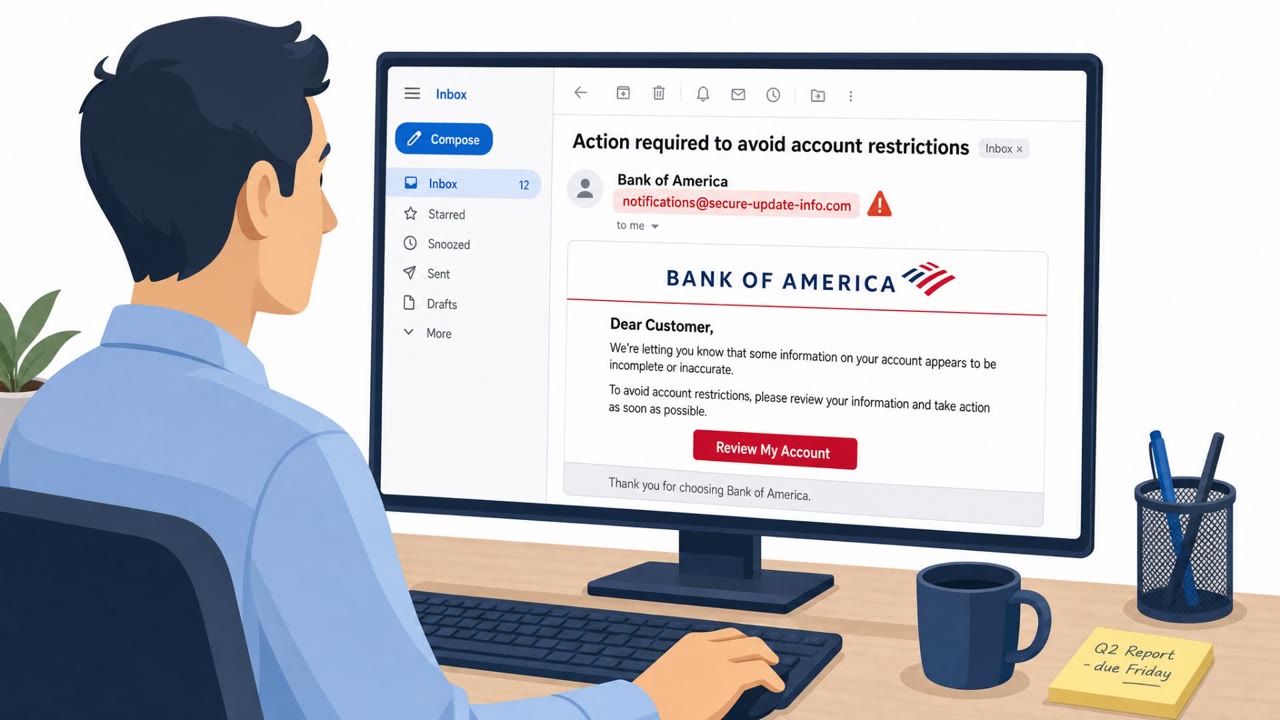
Fake Bank of America Email Pushes Remote Access Tool

Infosecurity Magazine · Medium sophistication
Last updated August 5, 2026

Cybercriminals sent emails styled like Bank of America that redirected victims to fake pages and pushed a download called “Account Guard.” On Windows, the download installed ScreenConnect remote management software, giving attackers remote control of the device. The campaign used lookalike domains and a multi-step script chain to hide what it was doing.

Key findings

  • Phishing emails impersonated Bank of America branding and directed users to a fake “Security Centre.”
  • The email chain led Windows users to download and install a fake protection tool called “Account Guard.”
  • Clicking “Update My Information” delivered AccountGuardSetup.zip containing a .vbs script that ultimately installed ScreenConnect (remote management software).
  • Different experiences were served by device type: Mac users were prompted to submit “valuable personal information,” while Windows users were pushed to install software.
  • The campaign used lookalike domains (e.g., bkofamerica[.]com) and multiple redirect domains (kleinschnitg[.]com, sectioncompil[.]com).
  • After installation, ScreenConnect connected to a suspected C2 at 217.60.195[.]167 on TCP port 8041 and waited for commands.
  • Huntress advised focusing on the sender and link destinations as a primary mitigation.

Who’s being targeted

  • Commonly targeted roles: All employees, Executives, Finance/Accounting, IT helpdesk/service desk.
  • Affected industries: Finance/Banking, Consumers/Individual users.
  • Attack channels: email, website.
  • Impersonated: Bank of America.

Awareness takeaways

  • Train staff to hover/check links and verify the real domain before clicking, especially for banking or “security center” messages.
  • Treat unexpected “security software” downloads from emails or web pages as a major red flag; do not install tools unless IT/security approved.
  • Coach users to be suspicious of ZIP files and script files (like .vbs) coming from the web, these are common ways attackers start an infection chain.
  • Remind users that scams may show different content depending on device (Mac vs Windows), so reporting suspicious pages still matters even if nothing downloads.

Red flags to watch for

  • Lookalike domains (not the real bank domain)
  • Security tool download offered from a bank-branded webpage
  • Unexpected ZIP download containing a script file (.vbs)
  • Pressure to install software from a bank website (banks typically do not distribute endpoint installers this way)
  • Download is a ZIP containing a script (.vbs)
  • The button name (“Update My Information”) does not match the action (software installation)
Try Mirage

Mirage safely runs attacks like this one against your own team, so you find out what happens before a real adversary does.

Get a demo
Read the video transcript

You get an email that looks like Bank of America, warning: “Visit our Security Centre to protect your account.” You click. The “Security Centre” page looks bank-branded, but the address bar says bkofamerica.com and random redirects like kleinschnitg.com flash by. On Windows, the page pushes a tool called “Account Guard.” You click “Update My Information” and instead get AccountGuardSetup.zip with a .vbs script that secretly installs ScreenConnect remote control. Here’s the move: before you click any bank “Security Centre” link, hover and read the domain. If it’s not the exact bank site you expect, close it and report it to IT.

Similar attacks

Fake Bank of America Email Pushes Hidden ScreenConnect

Fake Bank of America Email Pushes Hidden ScreenConnect

Attackers are impersonating Bank of America in mass phishing emails to pressure people into clicking a link “to avoid account restrictions.” Mac users are led to a fake login page that steals credentials and personal/financial data, while Windows users are tricked into installing a ScreenConnect…

August 5, 2026
“Case Documents” Lure Hits Law Firm via LNK

“Case Documents” Lure Hits Law Firm via LNK

Researchers reported a real spear‑phishing intrusion against a law firm where attackers sent a message with a link to an encrypted archive. The archive contained a Windows shortcut (LNK) disguised as “Case Documents,” and running it launched a multi‑stage loader (“HollowFrame”) that ultimately…

July 31, 2026
Fake Zoom/Adobe Updates Drop ScreenConnect Backdoor

Fake Zoom/Adobe Updates Drop ScreenConnect Backdoor

Researchers described an active phishing campaign that tricks people with fake Adobe/Zoom update and “document review” themes to install the legitimate ScreenConnect remote-access tool. Once installed, attackers get persistent remote control of the victim’s computer while blending in as normal IT…

August 4, 2026
Larva-24009 Lures Firms With Fake Doc Attachments

Larva-24009 Lures Firms With Fake Doc Attachments

AhnLab reports Larva-24009 has continued phishing campaigns through 2026, sending emails that trick employees into opening fake “document” attachments that are actually shortcut (LNK) files. When opened, the attachment runs hidden PowerShell commands, shows a decoy document, and silently downloads…

August 3, 2026
Invoice Phish Leads to Resilient ValleyRAT

Invoice Phish Leads to Resilient ValleyRAT

A Japanese industrial manufacturer was targeted by the SilverFox group using an invoice-themed phishing email that kicked off a multi-stage malware chain. The campaign abused legitimate software and cloud services to load a malicious DLL, disable security tools, and establish remote access with…

July 31, 2026
Fake Teams Update Drops Remote-Access Tools

Fake Teams Update Drops Remote-Access Tools

Researchers reported a real phishing campaign (“Operation BlueDash”) that tricks users with a “secure document” lure and routes them to a fake Microsoft Store page that claims Microsoft Teams must be updated. The download installs legitimate remote access tools (Level RMM and ScreenConnect) so…

July 27, 2026