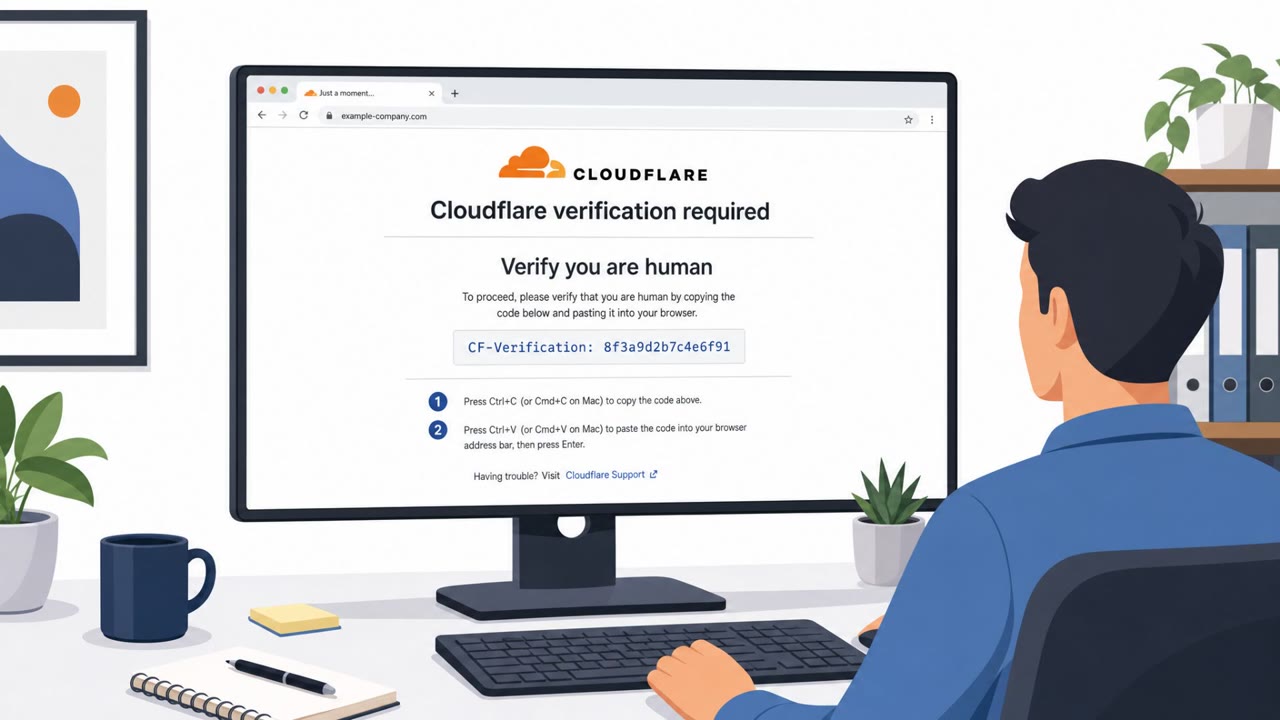
Attackers compromised hundreds of legitimate websites and injected code that sent visitors to a fake Cloudflare page. The fake page used a “ClickFix” trick to convince users to run steps that installed malware. The incident shows how criminals can use trusted brands and trusted sites as the delivery mechanism, not just as a reputational issue.
How the attack worked
Attackers compromised legitimate, trusted websites and injected code that redirected visitors to a fake Cloudflare verification page. Rather than a normal CAPTCHA, the page walked users through steps framed as a browser "fix" or security check. Following those steps resulted in malware being installed on the visitor's device, a technique known as ClickFix. Researchers found the same injected code running across hundreds of unrelated sites, all feeding shared attacker infrastructure, which suggests a coordinated campaign rather than isolated incidents.
Why it succeeded
The campaign worked because it exploited trust in two layers at once: trust in the compromised website itself, and trust in Cloudflare as a security brand that many users already associate with legitimate verification prompts. Visitors were not clicking a suspicious link in an email, they were visiting sites they already trusted, including institutions like Harvard, Oxford, and DuckDuckGo. That combination made the fake verification step feel like a routine part of browsing rather than an attack.
What to watch for
- An unexpected "security check" or "verification" page appearing after visiting a normal, trusted website
- Instructions that go beyond a simple checkbox or CAPTCHA, especially anything asking you to run commands or steps on your own device
- A verification prompt that appears mid-browsing rather than during a login to internal company systems
- Multiple unrelated sites showing the same unusual prompt, which can indicate shared attacker infrastructure behind the scenes
Building resistance
Organizations and individuals should treat any prompt asking them to "fix" or manually resolve a browser issue as a red flag, regardless of how legitimate the branding looks. Employees, students, faculty, and customers should be reminded that trusted brands and trusted sites can be used against them, since attackers in this case are described as posing as something users already trust. Security teams should also recognize that blocking a single malicious URL inside the corporate perimeter does not remove the underlying infrastructure; the article notes this can lead to a whack-a-mole cycle where blocked links simply reappear elsewhere. Reporting suspicious pages and supporting broader takedown efforts is more effective than local blocking alone. Given that this incident spans education, online platforms, retail, and financial services, awareness training should extend beyond IT and security staff to include marketing, brand, and legal teams who may be first to notice brand impersonation affecting their own organization's web presence.
Key findings
- Attackers “poisoned more than 700 websites,” including Harvard, Oxford, and DuckDuckGo, to push victims into a malware-install flow.
- Visitors were shown “a fake Cloudflare page” that attempted to trick them into running a “ClickFix” attack to install malware.
- Researchers found “the same injected code running across hundreds of unrelated sites, all feeding shared attacker infrastructure.”
- The article claims “two rival criminal groups were fighting each other for control of the same hijacked sites,” suggesting active, competitive exploitation.
- The piece highlights that blocking individual phishing URLs internally doesn’t remove the underlying attacker infrastructure and can lead to “whack-a-mole.”
Who’s being targeted
- Commonly targeted roles: All employees, Executive leadership, Marketing/Brand teams, Legal, SOC/Incident Response.
- Affected industries: Education (universities), Online services / web platforms, Retail and ecommerce, Financial services.
- Attack channels: website.
- Impersonated: Cloudflare.
Red flags to watch for
- A trusted site unexpectedly asks you to run steps on your computer to “verify” or “fix” access
- A verification page appears to be Cloudflare but shows unusual instructions beyond a normal CAPTCHA
- The prompt appears after visiting a legitimate organization’s website (not after logging into your company systems)
Frequently asked questions
What is the ClickFix attack seen on hijacked websites?
It is a technique where a fake Cloudflare verification page tricks visitors into manually running steps that install malware on their device.
How many websites were affected by this campaign?
Researchers found that attackers poisoned more than 700 websites, including sites run by Harvard, Oxford, and DuckDuckGo.
Is blocking the malicious URL enough to stop this threat?
No. Blocking a phishing URL internally only stops it from resolving inside your own perimeter, but the broader attacker infrastructure remains active and can resurface elsewhere.
Why does this attack matter even though it targets trusted brands?
It shows that trusted brands and trusted websites can be turned into delivery mechanisms for malware, meaning trust alone is not a reliable safety signal for users.
Read the video transcript
You land on Harvard’s website, and suddenly a Cloudflare ‘Security Check’ pops up, telling you to fix your browser. Researchers found more than 700 poisoned sites, even Harvard, Oxford, and DuckDuckGo, showing this fake Cloudflare page that walks you through a ‘ClickFix’ step to silently install malware. Here’s the trick: real Cloudflare checks are just quick loading or a CAPTCHA. If a ‘Cloudflare’ page tells you to download, run commands, or change settings on your computer, that’s not protection, that’s the attack. If any ‘Cloudflare’ page on a website asks you to run steps on your device, stop immediately and report it to security, don’t click through a ClickFix into malware.